Chapter 5. Introduction to text analysis
Despite the many things that computers can do – including many things that humans cannot (easily) do – computers are not intelligent. All of the power of computers flows from the fact that they can do things very fast, and with vast amounts of data.
This is true even for artificial intelligence (AI) applications, such as large language models (LLMs), which is the technology that AI chatbots are based on. These systems create an appearance of intelligence, but at their core is just very fast (but quite simple) processing of very large amounts of data.
5.1. The superpower of computers: speed
The incredible speed of computers can be used to achieve many very different things. In the previous chapters, we have seen how it can be used to create games: the computer can draw an image consisting of many, many pixels, then draw it again slightly differently, and then again, so fast that it appears to us as smooth motion. Animation is just an optical illusion: it is a series of still images drawn so quickly that we cannot recognise the individual images.
The example we have programmed in the previous chapters is a very simple one. You will likely have seen more professional computer games, possibly including three-dimensional representations of imaginary worlds and complex interactions of game characters. Those examples show you even more clearly how fast computers are: they compute complicated models of a three-dimensional scene and display these on screen so quickly that we see it as smooth animation.
Ultimately, this effect is based just on the fact that the computer can hold vast amounts of data (thousands of game objects, millions of pixels) and can process them very quickly.
The same is true for any other of the many things that computers can do. You see examples of the amount of data and the computer’s speed when a search engine searches hundreds of millions of webpages in fractions of a second, or when an online map can show you details of any place in the world almost instantaneously.
One specific area which makes use of the memory size and speed of computers is data science. We will now have a closer look at this topic, and especially at a specific sub-field: text analysis.
5.2. Data science and text analysis
Data science is a field that is concerned with gaining insights from large amounts of data. It usually combines techniques from statistics, computer science and visualisation to extract meaning out of data sets that are too big to analyse without computers.
The actual data can be many different things: data science can be used to analyse healthcare data to predict disease risks, or it can be used to analyse traffic and transport data to improve planning of public transport systems. Equally, it could be used to analyse financial data to detect online fraud, or environmental data to make climate or weather predictions.
A sub-field of data science is text analysis. This is one of the earliest examples of data science techniques, and it uses text documents as the data to be analysed. This might be used, for example, by historians to classify large amounts of ancient scanned documents, or it could be used by political scientists to analyse public opinion by scanning online comments.
In this chapter, we will start looking at some examples of simple text analysis to get a feel for how this works. Doing this, we will practice some important Python programming concepts, gain a first insight into data science and – in a later chapter – even get a first insight into the basics of how LLMs work.
5.3. Working with strings
The Python string type (usually abbreviated to str in the documentation) stores text strings. Text strings are just sequences of characters of any length. Thus, you can store your name in a string, or a whole book. In one extreme, a string might be empty (a text string of length zero), or it may hold the entire text of a Harry Potter book.
 String variables store text. The text can be of any length: it may hold just a few characters, or the text of a whole book.
To get started with text analysis, we essentially have to get proficient with working with strings.
5.3.1. Counting characters
One of the simplest things we can do with the string is to count the number of characters in it. We will do this – and a number of other execises – using a simple starter project called text-analysis.
Exercise 5.1 Open the text-analysis project from the Chapter05 folder in the book projects. When you run the project, you will notice that it produces no output. Add a statement at the end to print out the content of the text variable.
Exercise 5.2 Change the content of the data string to your own name. Run the program again.
We can very easily count the number of characters in a string using Python’s built-in len() function. This function can count the length of various kinds of sequences that Python works with. Strings are one example; we will later see other sequences that we can count.
Calling this function with a string as a parameter is straightforward:

In this statement, we call the len function with a string parameter, and the function returns a number of type int to us. Here, we store that number into a variable.
Exercise 5.3 Add code to your program to count the number of characters in your name and print out the result.
The len() function can be used to count the length of a string (the number of characters). len() is a built-in function that is always available; it does not need to be imported.
5.3.2. Formatting output
If we want to format text output in a specific way, we have several options that give us various levels of control over the exact appearance. Assume we want to embed the number of characters in the middle of a sentence. The intended output of our program might be:
Wolfgang Amadeus Mozart
The string contains 23 characters.
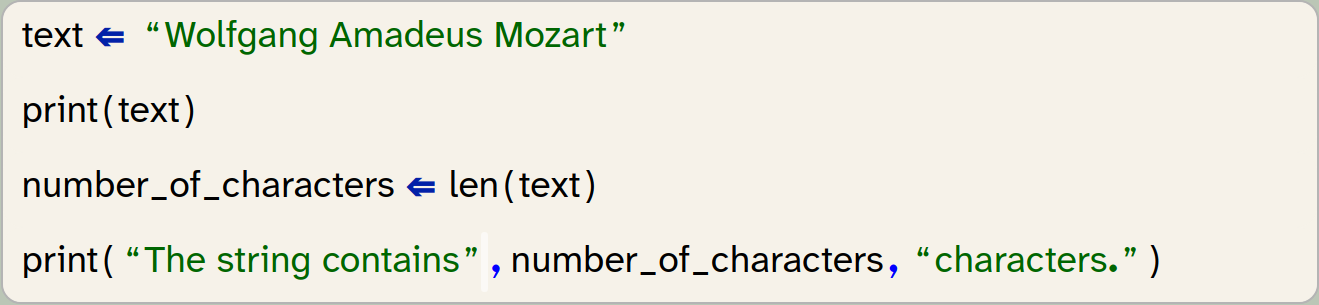
Here we can see that the print statement accepts multiple parameters, separated by commas, and it will print out each parameter, on the same line.
Exercise 5.4 Experiment with using the print function with different parameter lists. Try, for example, print(1, 2, 3) and print(text, "text").
From this exercise we can see that the parameters to the print functions can be literals (strings or numbers), or they can be the names of variables. We could also write a function call directly into the print function. Let us consider these two lines from the previous code snippet:

If we do not need the number of characters again later, we can achieve the same task without the variable:

In this version, the len() function is called as part of evaluating the parameter list of the print() function, and the value it returns is passed straight to the print() function without assigning it to a variable. This is a perfectly valid alternative achieving the same goal.
One limitation when using this version of the print() function is the automatic insertion of spaces. If you paid close attention, you will have noticed that the print() function automatically added a space between each of its parameter outputs (before and after the number, in our example). What if we wanted our output in a slightly different format:
Wolfgang Amadeus Mozart
Length: 23.
If it is important to us to have the period after the number, then we now have a problem: Simply writing

does not do the trick, because it inserts a space between the number and the period. We might ignore the problem, because it does not seem terribly important. However, in some cases we care about the exact format of the output, and we want to have full control. For those cases, we can use an alternative mechanism: formatted strings (sometimes also called f-strings by Python programmers). We can write the following:

Note the character f before the string. Adding this prefix, the string becomes a formatted string, and it can now include placeholders in parentheses: { }. Between these parentheses, we can write the name of a variable, and the placeholder will be replaced by the value of the variable. It is also allowed to insert a call to a function (or any other expression) directly in the placeholder, and the resulting value will be inserted:

A formatted string can include any number of placeholders, and the programmer is in full control of the formatting and spacing of the resulting string.
Exercise 5.5 Rewrite the output of the length of the string in your program using a formatted string.
Exercise 5.6 Formatted strings can be used for more sophisticated formatting than we have discussed here. Find out about additional formatting options on the internet: do a web search for "Python f-strings" or "Python formatted strings" and find at least two other formatting options that are provided. Write them down.
A formatted string (f-string) can be used to include values from variables or computed values within a string. It also offers more detailed formatting options.
5.3.3. Processing individual characters
The next thing we might want to do is to access the individual characters in our string one character at a time. This, too, is fairly straight forward. We can use the for-loop, which we have already encountered previously:
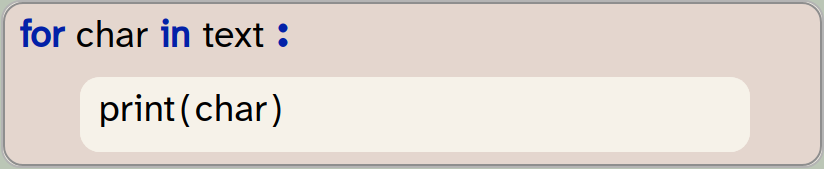
In this example, we assume that the variable text holds our string. In the for loop, we declare a variable called char to be used as our loop variable. The for-loop will assign each character of the string to the char variable in turn, and execute the loop body once for each character. Here, we just print out the character, but we could of course add more code in the loop body for more sophisticated processing.
A for-loop can be used to iterate over the characters in a string.
Exercise 5.7 Add the for-loop to your program as shown above. Test your program.
The project with the changes discussed thus far is available in the book projects as text-analysis-v2.
5.4. A first analysis: character statistics
Now that we know how to access and process characters in a string, we can start with some simple analysis. As a first step, we would like to print out information in the following format:
Text: "It was a bright cold day in April, and the clocks were striking thirteen."
Length: 74 characters
Characters without spaces: 60
Number of punctuation characters: 2
You can make a start towards this with the following exercises.
Exercise 5.8 From your existing program, remove the loop that prints out the individual characters. Write or copy/paste a sentence to be analysed and assign it to your text variable. Run your program to test.
Exercise 5.9 Modify the remaining code to produce the first two lines shown above. Make sure the format is exactly as shown there.
In the last exercise, you may have encountered a small issue: We would like to print out double-quotes around the actual text. Since we have used double-quotes to identify the string literal itself, we cannot simply write a double quotes inside the string. If we tried to use the following string:
"using "quotes" in a string - this does not work"
our program would fail, because the quotes intended to be within the string end the string itself, and we end up with invalid Python code. There are two possible solutions to this. The first one is to use a different string character. Since Python allows us to enclose strings with either single or double quotes, we can use single quotes to delimit the string if we wish to have double quotes within the string:
'using "quotes" in a string - now it works'
The second solution involves using a special character, the backslash: \. The \ character allows us to insert special characters into a string. Writing \" inserts a double-quote character into a string without ending the string:
"using \"quotes\" in a string - this works as well"
Using this second technique is useful if our string includes both single and double quotes.
Exercise 5.10 Make sure the output of your text is exactly as shown in the example above, including the double-quote characters.
5.4.1. Identifying spaces
Let us now work on producing the third line: counting the characters that are not spaces.
Counting all characters was very easy, since Python has a function built in that does the job for us. We only had to call len(text) and we were done. If we want to count the non-space characters, life is not quite so easy: Python does not have a ready-made function for this, so we have to do the counting ourselves.
We can do this by looping through all the characters in the string (we have done this before), looking at each character, and counting all the non-space characters. For the counting, we need to use a variable that we can increment for each non-space character:
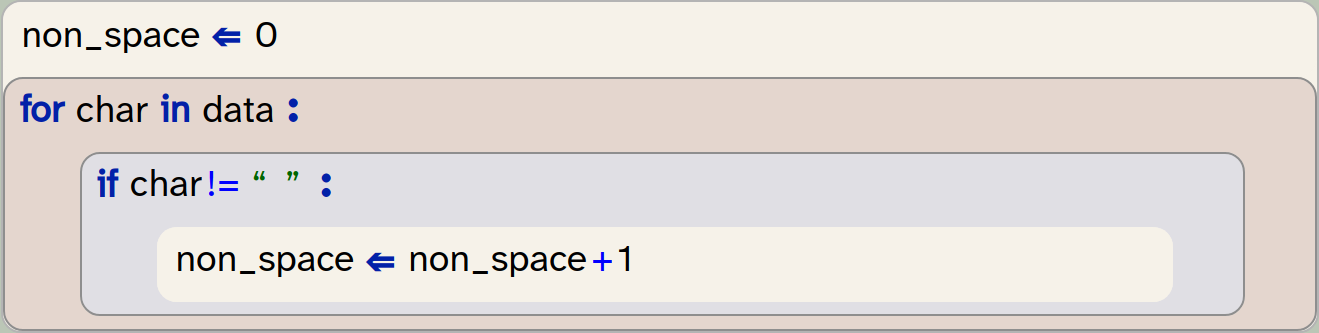
In this code, we first initialise a counter variable to 0. We do this so that we can increment this variable for each non-space character that we find, thus counting the characters. Note that we have named the counter variable non-space – it is always good practice to name the variable as precisely as possible to express what we are using it for. This name indicates quite clearly what we are counting with this variable.
We then write a for-loop to go through all the characters of our string, as before. But this time we have an if-statement in the body of the loop: We check whether the character is "not equal to" a space, and if this is true, we increment our variable.
Two things are worth noting here:
-
The operator != means "not equal". So the condition
char != " "will be true if the variablecharis not equal to the space character. You can see a list of all Python operators in Appendix D: Python operators. -
The line
non_space ⇐ non_space + 1increments the variablenon_spaceby one. Since in an assignment the right hand side is evaluated first, this statement reads the current value ofnon_space, adds 1 to it, and then writes the result back into the same variable.
Exercise 5.11 In your own program, implement this functionality: Print out how many non-space characters your text contains.
5.4.2. Identifying punctuation
We can write similar code to count the punctuation characters. Again, we use a for-loop that iterates through the characters in our text, looking at each character in turn. The main difference is that we now need to check this character against a whole group of other characters.
We can do this by first creating a string that includes all punctuation characters we wish to recognise:

In the condition of the if-statement (inside the loop), we now check whether the current character is contained in our puctuation string:
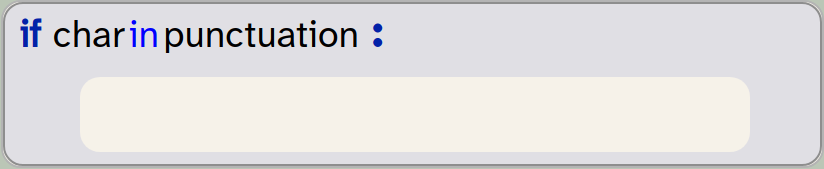
The in operator checks whether the character is included in the string, and returns True if it is.
Exercise 5.12 Implement the counting of punctuation characters in your own program. You can start by copying the counting of non-space characters and then making the modifications discussed above. Make sure to give your variables appropriate names!
One other small improvement we can make is to use a more complete set of punctuation characters. Luckily, we do not need to find out what they are and type them all in ourselves – Python already has a string variable with all punctuation characters in it. This variable is called punctuation and is defined in a separate module called string. We can use it by importing it from the string module:

When you add this import to your program, you should remove your own definition of the punctuation string. Your program will now use the complete set of punctuations as defined by Python.
Exercise 5.13 Make the changes discussed above to import and use the pre-defined punctuation string. Test to make sure your program works again.
Exercise 5.14 Print out the punctuation string to see what characters it contains. How many characters are in it? (Then remove this print statement again from your program.)
Exercise 5.15 Test your program with a few different sentences. Does it count correctly?
5.4.3. Better structure: using functions
If we want our program to be able to easily do this analysis for different texts, we can now move our code into a function which we can call repeatedly, with different text as a parameter.
Exercise 5.16 Define a new function, called analyse_text, that takes one parameter called text. Move all your code that analyses your text from the "My code" section into this function.
Exercise 5.17 In the "My code" section, write a call to your analyse_text function that passes your test sentence as a parameter. Run your program. Make sure that it produces the correct output again.
Exercise 5.18 In your "My code" section, add two more calls to your analyse_text function, passing different strings as parameters.
An example of the project after these changes is in the book projects as text-analysis-v3. Compare your own version with this one.
5.5. Handling files
We have said above that an advantage of using computers is that they can do tasks very quickly, and with amounts of data that we would not want to process by hand. So let’s try this out: Before we go on to count words and sentences, let us first see whether our program can cope with larger text sizes.
Strype has a read-only file system that provides some data files to use with our projects, including the text of some books. One of them Pride and Prejudice by Jane Austen. The file is a plain text file, accessible at /books/pride-and-prejudice.txt. (This is the full text of the book.)
The project you have been working with includes a helper function called read_file(filename), which you can use to read a file from the file system. This function returns the content of the file as a string. So we can now easily read in this whole book from our file system, and then pass it to our analyse_text function:

 Working with data files in Strype: To access data files in Strype, you have two options: You can read from the built-in file system or from your own cloud storage.
The built-in file system provides a fixed set of read-only files for your projects. You can explore what is available at strype.org/doc/filesystem. These files are also available for download in the Material section on the book website.
If you wish to use your own data files, your Strype project must be stored on a cloud file system (such as Google Drive or OneDrive), and the data file must be stored in the same folder as your Strype project. Then the data file will be accessible with its filename (without a path).
You cannot access data files on your local computer. The reason for this is security: web applications running in a browser are not permitted to access your local file system, so Strype cannot read from or write to your own local drive.
Exercise 5.19 Make the changes discussed above: Instead of using a string literal, read the text file from the file system, and store the text in a variable. Pass this variable to your analyse_text function.
Exercise 5.20 If you have run your program after the previous exercise you will notice that it takes some time to complete. This is because it prints out the complete text to the terminal! With a text of this length, this does not make much sense. Remove the printing of the actual text from your analyse_text function.
Exercise 5.21 Print the title of the text being analysed before its details are printed.
Exercise 5.22 The Strype file system contains the full text of two other books, in the files "/books/war-and-peace.txt" and "/books/winnie-the-pooh.txt". Add the analysis of these two texts to your program.
Exercise 5.23 One small improvement we can make is to print a comma as a thousand separator in our number output. For example, the number 2760512 would then be shown as 2,760,512. In a formatted string, this is easy: If we use the placeholder {number:,} in our f-string (that is: if we add :, after the variable name), then the number will be shown with a thousand separator. Make this improvement for all the number outputs in your own code.
Text files can be read from the file system. The content of a text file is usually provided as a string.
Code completion for data files: The names of the available data files in the Strype file system can be accessed via code completion: Place the cursor inside an empty string (within the quotes in this line):

and then use Ctrl-Space to invoke code completion. The completion dialogue will show all available data files.
5.6. Linguistic analysis
We can see that we can quite easily process large amounts of text with our program. We would certainly not want to count the numbers of characters in War And Peace by hand, and getting a computer to do this for us helps.
But why would we want to know the amount of characters in the first place? In reality, the plain number of characters itself is not often that interesting. But it gets more interesting once we start counting words and sentences and analysing them. Then we get into the area of linguistic analysis, which can be used, for example, to draw conclusions about the author of a written work.
A famous case concerns the works of William Shakespeare. A passionate debate has raged on and off at least since the 19th century about the authorship of Shakespeare’s work. While theories that another author has written all of Shakespeare’s works are almost certainly untrue, and are usually dismissed by serious scholars, debates about individual works are quite valid. There are several written works where authorship is unclear: either works attributed to Shakespeare where authorship is not proven, or unattributed works that may have been written by him.
It gets even more complicated: In the 17th and 18th century, it was not uncommon for theatres to commission for existing plays to be padded out by paying other writers to add scenes or acts to other authors' plays to make them longer. Many scholars believe that Shakespeare’s plays contain parts that may not have been written by him.
Linguistic analysis has been used as one tool to provide some evidence in this debate. It is based on the observation that this analysis can detect a personal style in the use of words, which can then be used – in a way similar to a linguistic fingerprint – to identify the author. It alone cannot give conclusive answers, but it can add interesting pieces of evidence for scholars. See, for example, Shakespeare by the Numbers[1] from the Shakespeare Oxford Fellowship.
Another example where linguistic analysis is used is to determine the reading complexity of written texts. Various algorithms exist to determine a "reading ease score" for a given text which expresses how hard or easy it is to comprehend. This may be used to choose appropriate books to study at school for specific age groups, or to make sure that important instructions provided with medication are not too complicated to be understood by the majority of the population.
One thing all forms of linguistic analysis have in common is that counting characters is not enough. At a minimum, we have to be able to identify and count words and sentences. So let us go on and investigate how to do this now, and then calculate a "reading ease" score for our documents.
5.7. Analysing words, sentences and syllables
5.7.1. Counting words
Counting the number of words in a text is very easy, because Python strings have a method called split, which splits the string into words. It will return to us a list of strings in which every element is an individual word from the original string. We can use it like this:

Note that this is a method of the string object (not a free-standing function) so we call it using the string variable, a dot, and then the method name.
To be precise: The split method splits the original string at every occurrence of whitespace. Whitespace is any space, TAB character or line break. Punctuation characters will not be treated specially, so that, for example, this sentence would be returned containing the word "example," (including the comma as part of the word.) If we wanted to analyse specific words, we would have to remove the punctuation characters. However, for counting words, this is not a problem.
Once we have received the list of words, we can obtain the number of words just by looking at the length of the list – it has one element per word. The built-in len() function, which we have seen earlier to count characters in a string, can also tell us the length of a list:

This is all that is needed to count and then print out the number of words.
The built-in len() function can be used to return the length of a list.
Exercise 5.24 Implement the counting of words in your own project. Print out the number of words as part of your analyse_text function.
5.7.2. Again: using functions to improve structure
While we add functionality to our program, our functions tend to get longer and longer. In our case, the analyse_text function has now become quite lengthy.
Long functions (or a long sequence of code in the "My code" section) make a program hard to read and hard to understand. And if a program is hard to understand, it is much more likely that errors creep in, or that we have difficulty to extend or change the program.
Our goal should always be to write short, concise, focussed functions. (The technical term for this is "cohesion": we aim to write cohesive functions.) The guiding rule is that every function should be responsible for one single clearly defined task.
Every function should be responsible for one single well-defined task.
Looking at our analyse_text function, we can summarise what it does like this:
-
It prints out the length of the text (the number of characters).
-
It counts and prints the number of non-space characters.
-
It counts and prints the number of punctuation characters.
-
It prints out the number of words in the text.
As we can see, these are four separate tasks. None of them really depends on the others; they are quite separate.
Following our rule of functions doing a single task, it follows that these four tasks should all be in separate functions. Creating this structure does indeed create a much more readable program, which will be easier to understand and maintain. Make this improvement in your own code by doing the following exercises.
Exercise 5.25 Create four new functions for the four separate tasks listed above. Make sure you name these functions appropriately, so that the name describes what they do. Move the code to implement each task into the body of the corresponding function. Then rewrite your analyse_text function to call these four functions. Test your program to make sure it still works; it should now do the same it did before these changes.
One further improvement we can make is to modify our new helper functions to calculate their results and then return them (instead of printing them). This separates the calculation logic from the printing, and leaves it the task of the analyse_text function to decide how to print the results. The function to calculate the number of words, for example, might then look like this:
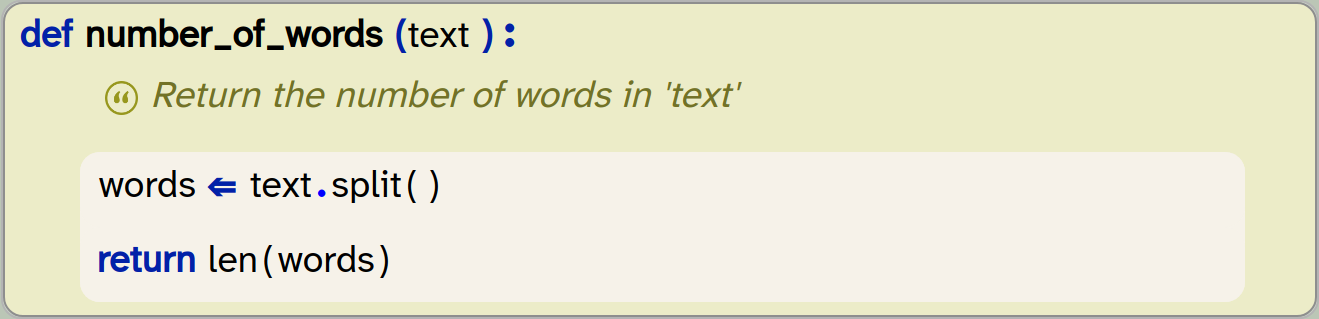
The analyse_text function can then simply call this function and print out its result.
Exercise 5.26 Modify your four new helper functions to calculate their results and return the result as a function result, using the return statement. Print out the result in the analyse_text function.
Exercise 5.27 You will notice that your own function to calculate the length of the text in characters just makes one call to an existing function (the len() function). In this case, your own function may not be necessary. You can remove this function and call the len() function in analyse_text instead.
Exercise 5.28 The project text-analysis-v4 in the book projects contains all the changes discussed here so far. Look at it and compare your own solution to this one. Have you done anything differently? Can you spot anything that you can improve?
The tasks carried out in this section of the book did not change the functionality of our program. It does exactly the same as before. So were they worth doing?
In these tasks, we did not add functionality, but we instead cleaned up the implementation and made our code more readable and easier to modify and extend. Just all-round nicer.
In general, when we are programming, we should alternate between these two phases: add new code, then clean up the code we wrote and make it as nice as we can. Many novice programmers do not bother to do this. The result would be that we end up with long, messy, hard-to-read code, and at some point we will get stuck with a program that we can no longer understand and maintain. Being a good programmer means not only to write correct code, but also to write readable code.
What we have seen here is that defining separate functions serves two distinct purposes: Firstly, when we have defined analyse_text as a separate function, we have seen that we can then call this function two or three times, without needing to write the code two or three times. Thus functions serve to support reuse: We can reuse the same code repeatedly and easily.
Secondly, with the functions we have created in this section, we have used them to support modularity. We divide our whole program into small and simple building blocks (the functions), which we can then assemble to solve larger tasks. This helps us solve problems by dividing larger problems into smaller sub-problems, and also serves to keep our code clear and readable.
Using functions supports code reuse: Once a function is written, it can be called multiple times, in different places, without the need to write the code twice.
Using functions supports modularity: Breaking up our code into separate functions structures our program into logical tasks. This makes the code easier to understand and easier to modify.
5.7.3. Counting sentences
Counting the number of sentences in a text is a bit more involved than counting words, because there is no built-in string function to do this. But it is not very difficult. In fact, it is quite siumilar to something we have already done: counting punctuation characters.
In this case, we do not want to count all punctuation characters, but only those that end a sentence. As a starting point, we can just assume that the full stop, exclamation mark or a question mark end a sentence, and thus just count those characters. We can do this again, as we have done before, by using a for-loop and an if-statement to count those characters:
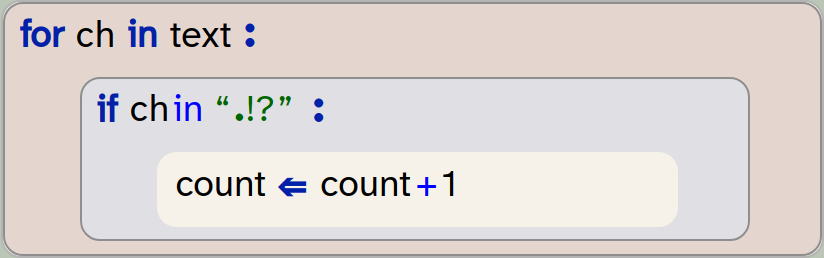
Exercise 5.29 Implement the counting of sentences in your project. Follow the same structure as before: Create a separate function that returns the number of sentences in a text as a return value.
Of course, the counting of sentences in this way is not entirely accurate. If, for example, the text includes three dots … – this would be counted as three sentences, which is not correct.
There are two ways to deal with this: The first is to refine the function that counts sentences to take this into account. The second is to live with this approximation. In a long text, this inaccuracy will be small, and for many purposes our approximate (almost correct) result will be good enough. So the solution to choose depends on the context.
What we intend to do is to calculate a text complexity score. For this purpose, this approximate result is good enough, and we choose to leave it as it is.
5.7.4. Counting syllables
Counting syllables in the English language (and most other languages) is much more complex than counting words or sentences. Because of this, we will use another approximation here: We will use a heuristic (which is essentially just a rule of thumb), which says that in the English language on average the number of syllables in a word is the number of characters, divided by 3.2, rounded to a whole number.
In Python, we can write this like this:

In this code, we can see that we again use the len() function to get the number of characters in a word, and that there is a built-in round() function to round the result to a whole number for us.
The round(n) function can be used to round a decimal number to an integer (a whole number).
Exercise 5.30 Do some research on the round() function. You can do this by doing a web search for "Python round". What is its optional second parameter?
Exercise 5.31 Implement a function in your code to calculate syllables in a word, using the formula above. Test it by calling it with some words. How often is it accurate?
Now that we can compute the number of syllables in a word, we can calculate the number of syllables in the whole text by just looping over all words again, and adding up the syllables of each word:
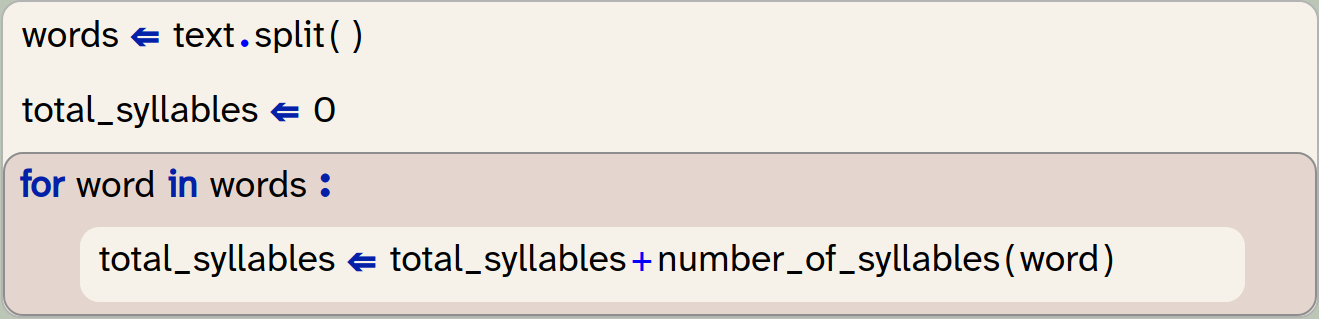
Note that this is different to just applying the formula to the length of the whole text, because the rounding for each word affects the result.
Exercise 5.32 Add code to your program to calculate and print the total number of syllables in your text.
5.8. Text complexity
The last thing we will do in this chapter is to calculate the text complexity using a reading ease score. Now that we can calculate all sorts of statistics of our texts, this is quite straight forward.
Several different formulas are in use by professionals to do this. We will use one of the most commonly used methods, the Flesch reading ease score. (If you want to find out details about this, do a web search.)
The Flesch reading ease score is calculatred with the following formula:

This formula will give us a score between 0 and 100. This score can then be used to classify the difficulty of the text, using the following table:
| Score | Readability | Who can understand it |
|---|---|---|
90–100 |
Very easy |
Understandable by an average 11-year-old student |
80–90 |
Easy |
Conversational English for consumers |
70–80 |
Fairly easy |
Understood by most 12-year-olds |
60–70 |
Standard |
Plain English. Easily understood by 13- to 15-year-old students. |
50–60 |
Fairly difficult |
School students in 10th to 12th grade |
30–50 |
Difficult |
University graduates |
< 30 |
Very difficult |
Specialists, experts |
Looking at the formula, we can see that we need only three values as input, all of which we have already computed: The total number of words, the number of sentences, and the number of syllables in the text.
This means that we can now write a function to calculate the reading ease score, and call it with these values:

The body of this method here is incomplete – we leave it as an exercise for you to fill it in.
Exercise 5.33 Write a function to calculate the Flesch reading ease score as shown here. Return the correct score using the formula shown above.
Exercise 5.34 The Flesch reading ease calculation regards parts of a sentence separated by a comma or a colon as separate sentences. Add these two characters (,:) to your program so that these create separate sentences for the purpose of our calculation.
Exercise 5.35 Print out the reading ease scores for the text documents analysed in your program. (Hint: the score for Pride and Prejudice should be 73.62. If you see this result, then your program is correct.)
Exercise 5.36 You may have noticed that the output for your reading ease score shows many digits after the decimal point – many more than is useful. Print the result rounded to two decimal places. You can achieve this in one of two ways: You can either use the round() function (round (value, 2) will round value to two decimal places), or you can add the formatting option :.2f after a value in an f-string (e.g. f"Value: {value:.2f}" will do the same.)
Exercise 5.37 What is the reading ease score of the sentences
"Programming is fun. I enjoy it."
What is the score for the sentences
"The systematic development of correct computer code instills feelings of pleasure. It creates unquestionable sensations of distinct and surprising enjoyment."
Exercise 5.38 Use some texts of your own, and run your analysis on those. You can either find the full text of books on Project Gutenberg, a website that provides out-of-copyright books, or you can use, for example, the last essay you wrote for school work. In each case, you have to make sure that the text is saved in plain text format. If the text comes from the web, make sure you download a "Plain Text" (or UTF-8) file. If it is your own document, and you wrote it in a word processor, make sure to save the file in plain text format before using it with your Python project. You can usually do this using the "Save As" menu item and selecting plain text format for saving. Also be aware that your project must be stored in a cloud file system to do this; see the Strype tip in Section 5.5, above.
As always, an implementation of the project as discussed here is available in the book projects; it is called text-analysis-v5.
5.9. Summary
In this chapter, we have concentrated on two areas. Firstly, we have worked with strings. Strings represent text, and when we can work with strings, we can analyse and manipulate text. Text analysis is a first example of data science, of which we will see a bit more in a later chapter.
In working with strings, we have seen how we can access individual characters and words, and how we can format strings to create output that looks exactly as we would like it to look.
Secondly, we have again seen examples of improving the structure of our code. We have used functions to create a program that is modular and readable. This is important to create code of good quality, as it makes it easier for others reading our code to understand it.
At the same time, we have also seen how to use variables to store values, count and make calculations. This will be of good use in many of our programs in future.

-
String variables store text. The text can be of any length: it may hold just a few characters, or the text of a whole book.
-
The
len()function can be used to count the length of a string (the number of characters).len()is a built-in function that is always available; it does not need to be imported. -
A formatted string (f-string) can be used to include values from variables or computed values within a string. It also offers more detailed formatting options.
-
A for-loop can be used to iterate over the characters in a string.
-
Text files can be read from the file system. The content of a text file is usually provided as a string.
-
The built-in
len()function can be used to return the length of a list. -
Every function should be responsible for one single well-defined task.
-
Using functions supports code reuse: Once a function is written, it can be called multiple times, in different places, without the need to write the code twice.
-
Using functions supports modularity: Breaking up our code into separate functions structures our program into logical tasks. This makes the code easier to understand and easier to modify.
-
The round(n) function can be used to round a decimal number to an integer (a whole number).

Particles
 Here is a project that shows a special effect. It is called
particles,
and it shows a sparkler effect around the mouse position. It demonstrates a few useful things: it shows how to create lots of actors to create a visual effect (and make them disappear just as quickly), it shows how to implement a gravity effect (the sparkles fall down, and accelerate as they do), and it demonstrates how to use a Gaussian distribution for random numbers (where more extreme numbers are less likely), and it shows how to read the mouse coordinates to use them in your program.
Here is a project that shows a special effect. It is called
particles,
and it shows a sparkler effect around the mouse position. It demonstrates a few useful things: it shows how to create lots of actors to create a visual effect (and make them disappear just as quickly), it shows how to implement a gravity effect (the sparkles fall down, and accelerate as they do), and it demonstrates how to use a Gaussian distribution for random numbers (where more extreme numbers are less likely), and it shows how to read the mouse coordinates to use them in your program.
Altogether it might give you ideas for visual effects you may like to add to your own games.