Chapter 9. Collection classes – a summary
This chapter is different in nature to the previous chapters in this book. We will not present a programming project for you to work through – instead, we will summarise and discuss a topic which we have mentioned previously, but not discussed in detail: collection classes.
We have seen that Python provides built-in classes for collections of data, and we have seen that these classes are very useful for our projects. The two collections we have used to far are lists and dictionaries. We have also briefly mentioned a third class: a tuple. Python has, in fact, another important built-in collection which we have not yet mentioned: a set.
In this chapter, we will investigate the characteristics and differences of these collections, so that we can make an informed choice when we need to use one of them in our future projects.
9.1. The four collections
Python has four main built-in collection classes that every programmer should know: list, set, dict and tuple. (There are other collection classes, but these four are the most important ones.) All of these serve to collect several items of data into a single grouping, which we can then store in a single variable. They differ in their characteristics and their uses .
All of these classes have methods that allow us to perform useful operations on them.
Let us have a quick look at each of these four classes before we describe them in more detail.
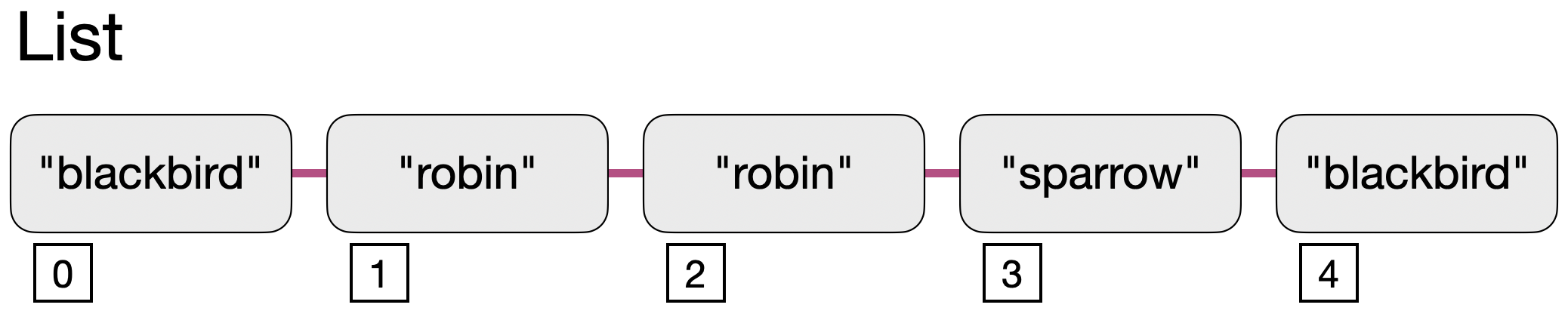
A list is an ordered collection of flexible length. Elements are accessed by index.
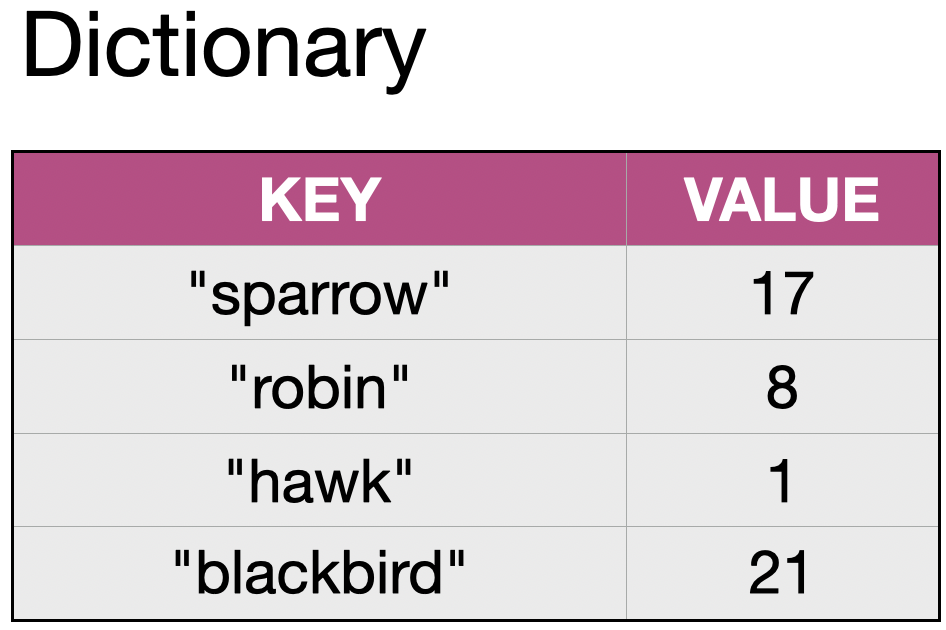
A dictionary (also known as dict) holds entries of key/value pairs. We can look up the value by providing the key.
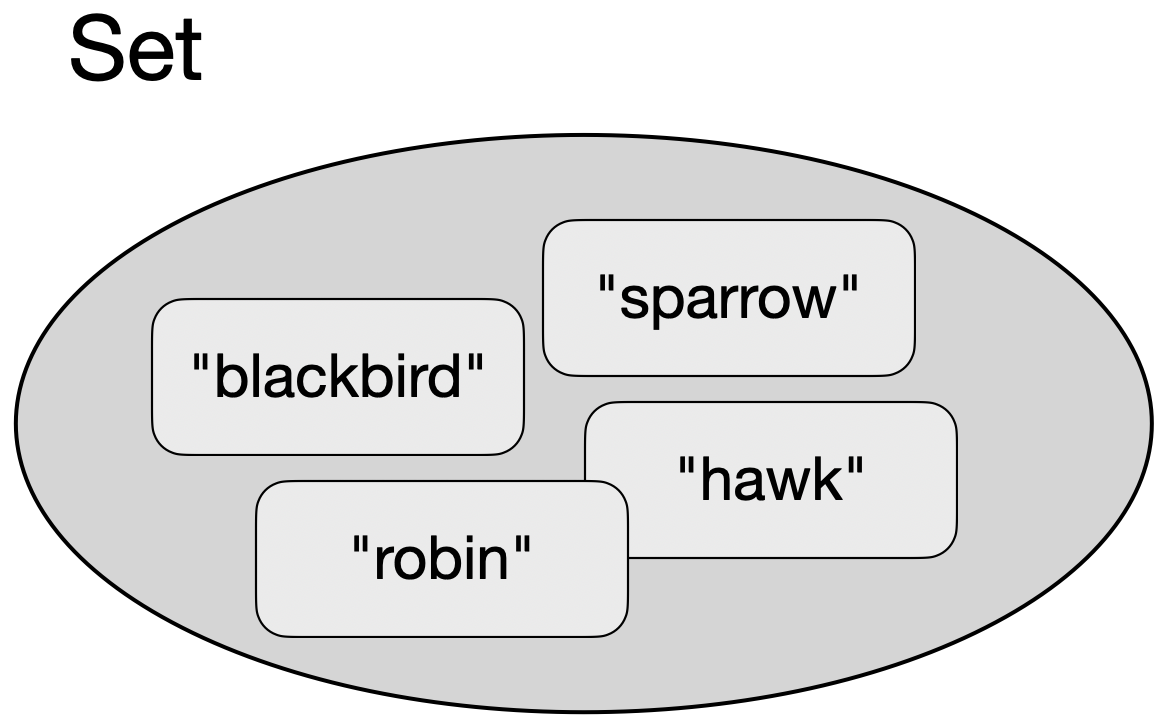
A set holds an unordered collection of its elements. Each element can occur only once.
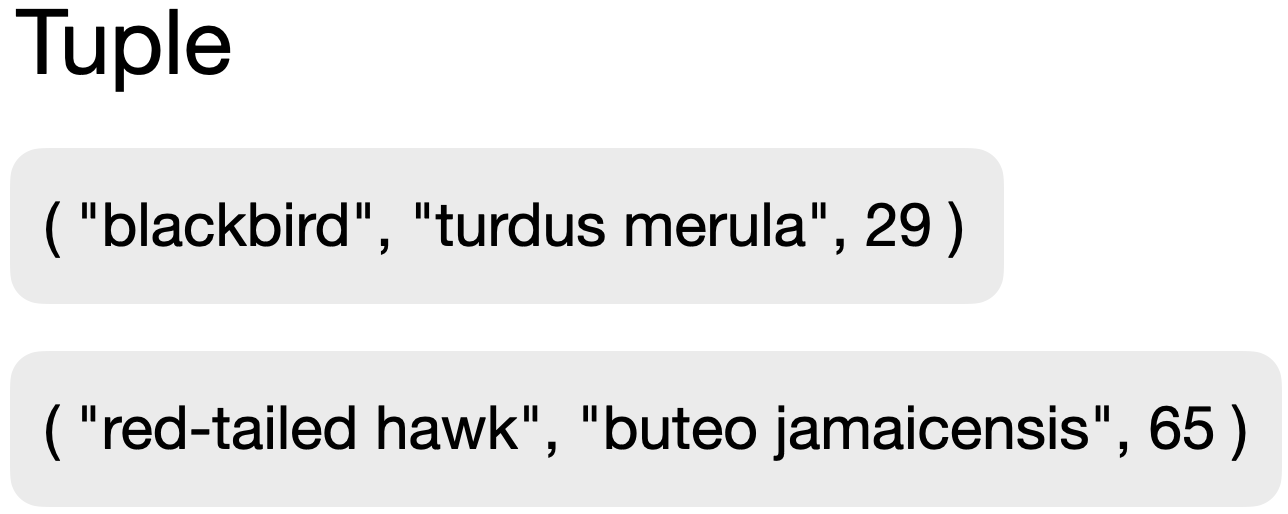
A tuple is a fixed, unchangeable grouping of several items of data into single item.
Below, we describe each of these classes and their characteristics and uses in more detail.
9.2. List
We have used the list class a few times in this book, and you hopefully have quite a good understanding already of what a list is and how it works.
We can represent a list graphically as a sequence of elements:
Syntax
In Python, lists are written using square brackets:

An empty list is created by using the square brackets on their own:

We can access individual list elements using their index:

List elements can be replaced. The following code will replace the second sighting with a different one:

Example
Assume we are programming a bird watching app, and we would like to record sightings of birds on a given day. The diagram above shows how each individual sighting can be appended to a list. With each new sighting, we could append a new entry at the end of the list (using its append() method), and the list would keep a record of all the sightings of the day.
Since the length of the list is flexible, we can record any number of sightings, and the order of the sightings would be maintained (we could later retrieve the information in which order we saw each bird).
The list class also allows us to insert elements at arbitrary positions in the middle of the list, delete individual elements, or access elements by index.
We can iterate over the list to receive the elements one by one, in the order in which they are stored.
While lists allow elements of different types to be mixed – we could, for example, have a list where some elements are strings and some are integers – this is rarely useful. Most of the time, we use lists where all elements are of the same type.
Characteristics
A list has the following characteristics:
|
Maintains the order of elements as they were inserted. |
|
Elements can appear multiple times. |
|
The size of the list can grow and shrink as needed. |
|
Elements can be replaced. |
Methods
To find details of the following methods, look them up online. Each of these methods may have required and optional parameters.
| Method name | Description |
|---|---|
|
Add an element to the end of the list. |
|
Remove all elements from the list. |
|
Return a copy of this list. |
|
Return the number of elements with a specific value. |
|
Add multiple elements from another collection to the end of this list. |
|
Find the index of an element with a specific value. |
|
Insert an element at a specific position. |
|
Remove and return the element at a specific position. |
|
Remove an element with a specific value. |
|
Reverse the order of the elements in the list. |
|
Sort the elements in this list. |
 A list is an ordered collection of flexible length. It allows duplicates, and elements may be replaced.
9.3. Dictionary
A dictionary is a mapping from a key to a value. We can think of it as a table with two columns. Each entry in the dictionary is a new row. We can then look up entries by providing the key and receiving the associated value.
Syntax
Internally, Python calls the dictionary class "dict". Dictionaries are written using curly brackets and colon-separated key: value pairs.

The statement above creates a dictionary with four entries, where each entry is a key:value pair.
An empty dictionary is created by using the curly brackets on their own:

To access elements, we can use the get method with the key as a parameter, and the dictionary will return the associated value. For example:

This will print the number 8 (assuming we have a dictionary as shown above.)
An alternative syntax allows us to use square brackets instead of the get method:

This achieves a similar result. In general, however, the get method should be preferred: If the key used in the get call is not present in the dictionary, it will return None. We can then check the result to see whether we did receive a value. If we do the same with the square bracket syntax (look up a non-existent key), this causes an immediate error, and we do not get the opportunity to check the result. Therefore, the square bracket syntax can only be used if we are certain that the entry exists.
Example
In our bird watching app, we might not be interested in the exact order in which we sighted each bird, but only in the number of each type of bird we have seen. In this case, a dictionary is an ideal collection to use. The example above illustrates how we can create a dictionary that uses the name of the bird species as a key and uses the value to store the number of sightings for that kind of bird.
When we later wish to add a sighting to our data, we need to carefully distinguish the case where we already have an entry for the bird species from the one where the bird does not yet exist. If the species is not in the dictionary, we will add a new entry. If it exists already, we need to read the current value, increment it by one, and write it back:
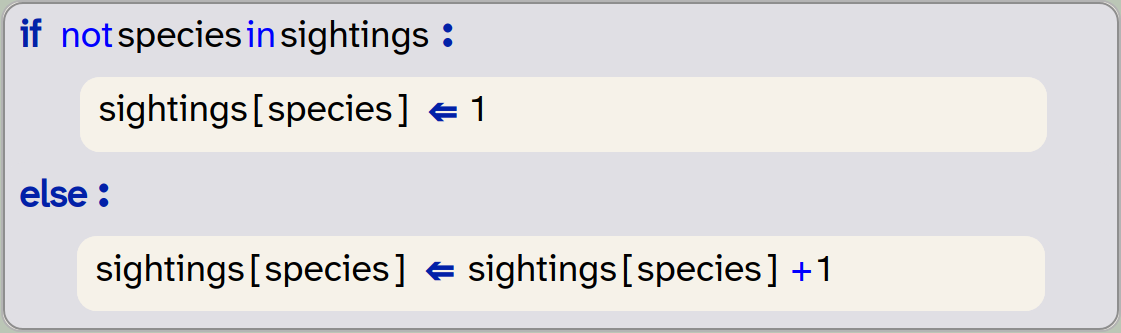
Note that using the square brackets to access the value is safe here, because we have checked that the entry exists.
We can safely omit the check for the existence of the entry by using the setdefault method:

This statement is worth studying carefully, since it can be confusing at first. The reason for the confusion is the puzzling name of the method. The method is more correctly described with a name such as get_value_or_set_default: What it does is this: If the first parameter (species) exists as a key, then it returns its value. If it does not exist, then it will create it, and use the second parameter (0) as its value.
Think this through with an existing and with a non-existent key: if the key exists, its value will be incremented. If it does not exist, it will be created and set to 1. Thus, this statement works in every case, without explicitly checking whether the entry existed.
We can also iterate over a dictionary in a very similar manner as we do with a list:
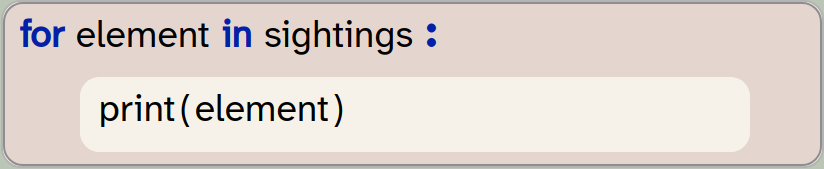
Be aware, though, that this pattern – where we use only a single loop variable, will just give us just the keys of the dictionary. To retrieve both the keys and the values, we can write a loop with two loop variables iterating over the dictionary’s items:
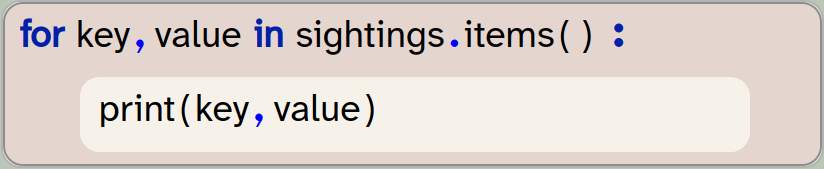
Characteristics
A dictionary has the following characteristics:
|
Entries are pairs of key and value. |
|
Maintains the order of entries. (This is not true for Python versions before version 3.7, but is true for Strype and all newer Python systems.) |
|
The same key cannot appear more than once. Assignments with an existing key will replace the entry for that key. |
|
The dictionary can grow and shrink as needed. |
|
Values for a given key can be replaced. |
Methods
The most important set methods are listed here. There are more methods available; you can find details online.
| Method name | Description |
|---|---|
|
Remove all entries from the dictionary. |
|
Return a copy of the dictionary. |
|
Return the value of a given key. |
|
If a given key exists, return its value. If it does not exist, set it to a specified value. |
|
Return a list of all items. Each element in the list will be a |
|
Return a list of all keys. |
|
Remove the entry with the given key. |
|
Remove the entry last added to the dictionary |
|
Return a list of all values. |
A dictionary is a collection of flexible length that holds key:value pairs. It is ordered and does not permit duplicate keys. Entries may be replaced.
9.4. Set
A set is a collection we have not encountered in this book before. It is, however, quite easy to understand: a set is an unordered collection that stores each element at most once. We can represent it graphically like this:
Syntax
Sets in Python are written using curly brackets:

Note that with this example, the sightings set would hold only three elements. We inserted a "robin" twice – this is not an error, but since the robin was already included before, the second adding of a robin has no effect.
Note also that the set uses the same symbol (curly brackets) as the dictionary. When writing literals, we can distinguish them by their elements: if the elements are pairs, we are creating a dictionary, if the elements are single values, then we create a set.
We cannot, however, create an empty set by just writing a pair of curly brackets ({ }), because this creates a dictionary. To create an empty set, we use the set() function instead:

We cannot access the elements individually (there is no index provided). When we iterate over a set, we will receive all the elements, but they will be provided in an unspecified order. The order in which they are inserted is not maintained, and it may change at any time.
Example
Thinking about our bird watching app again, we might use a set if we are only interested in the kinds of birds we spotted that day. If we do not care about the number of birds we saw, or in which order, then a set provides a much simpler and faster data structure to store this information.
We would still add an element each time we see a bird, and the set would automatically ignore duplicate entries. The size of the set is flexible as well, so an arbitrary number of species can be stored.
Elements in a set cannot be replaced. We can add and remove elements, but we cannot directly replace an element with another, as we can in a list.
As with lists, sets containing elements of different types are possible, but rarely useful. When mixing different types of elements, we also have to be aware of details of equality. For example, the values True and 0 are considered equal in Python, so in a set they would be considered duplicates. A set that contains the value False will therefore ignore the addition of a 0. This can be confusing, and sets with different element types are best avoided.
Characteristics
A set has the following characteristics:
|
Does not maintain the order of elements. |
|
The same value cannot appear more than once. |
|
The set can grow and shrink as needed. |
|
Individual elements cannot be changed. You can, however, remove and add elements. |
Methods
The most important set methods are listed here. There are more methods available; you can find details online.
| Method name | Description |
|---|---|
|
Add an element to the set. |
|
Remove all elements from the set. |
|
Return a copy of this set. |
|
Return a set containing the difference between two sets. |
|
Remove an element from this set. |
|
Return a set containing the intersection between two sets. |
|
Remove and return an element from the set. |
|
Remove an element with a specific value. |
|
Reverse the order of the elements in the list. |
A set is an unordered collection that does not allow duplicates. Elements can be added or removed, but existing elements cannot be changed.
9.5. Tuple
A tuple is a grouping of number of different data items into a single, fixed group. The following example shows two tuples which we may use for our bird watching app. In these tuples, we combine three pieces of data: the common name of the bird, the scientific name, and the maximum size (in cm).
Tuples are used to combine items of data that logically belong together and should be handled (created, stored, processed) as a single unit. The individual data items may be of different types. Once a tuple has been created, it is unchangeable: neither can the values in it be modified, nor can it be extended. It will remain as it is.
Syntax
Tuples are written using round brackets (parentheses):

In theory, we can create an empty tuple by writing just a pair of parentheses: ( ), but in practice this is not really useful. Since tuples cannot change later, this particular tuple does not hold any interesting information.
To access elements from the tuple, we can either use indices (in the same way as we do in a list):

or we can iterate over the tuple using a for-loop.
Example
Examples of tuples may include the representation of playing cards: ("diamonds", "7"), information about a person: ("Sam", "Smith", 21, 3, 2011, "f"), or information about a font style used in a text document: ("Courier", "Bold", 12, RED). In any situation in which different pieces of information belong together, they can be grouped in a tuple.
In the context of our bird watching app, let us assume that birds are actually captured, measured, recorded, and then released. Then we might want to record each sighting individually, including the recorded measurements. For this purpose, we might use a tuple to store the details:

When we store the sightings, we might then use a set or a list of these tuples, instead of storing just a list of strings.
Pairs
Sometimes we want to store two data items that belong together – this is often called a pair. Examples might be coordinates in a cartesian coordinate system (x, y), or the description of a musical note (frequency, amplitude).
While we may talk about a "pair" as a logical data structure, in Python it is not a separate type. A pair is simply shortcut name for a tuple with two elements.
Characteristics
A tuple has the following characteristics:
|
Maintain the order of elements. |
|
The same value can appear more than once. |
|
Elements cannot be added or removed. |
|
Existing elements cannot be changed. |
Methods
The tuple class has two built-in methods.
| Method name | Description |
|---|---|
|
Returns the number of times a value appears in this tuple. |
|
Returns the first index of the given value in the tuple. |
A tuple is a fixed collection that groups a set of data items together. Once created, it cannot be changed.
A pair is another name for a tuple with two elements. It is not a separate type in Python.
9.6. Combining collections
The last – and most powerful – aspect of collections is this: collections can be combined.
Collection classes themselves are types of data, and collections can hold elements of any type, so a collection can hold other collections.
In the last section above, we have already mentioned the possibility of a list of tuples. Equally, we could have a list of lists, or a dictionary where each value is a set. The depth of these nestings can be even deeper: There is nothing stopping us from creating a list of sets of dictionaries, in which the values are tuples.
This may sound complicated at first, but is in fact quite common, and not that hard to understand. Think, for example, of a contacts app on your phone or computer. At the top level, it might hold a dictionary with the name of a person as the key. The value – the information stored under the key – however, is not a simple type, but a tuple holding various pieces of data (phone number, address details, email address, picture, etc.). If we look at this even more carefully, we might realise that a person may have multiple email addresses, or multiple phone numbers. We do not know how many there are, so this should probably be a list. So we now have a dictionary holding tuples, in which some items are lists.
Constructs like these are common in computing, and we will see an example of this in action in the next chapter.
Collections can be combined. A collections can hold elements which themselves are collections. This can be nested to arbitrary depth.
9.7. Summary
Python has four main collection types: list, set, dictionary and tuple.
It is important for a good programmer to become familiar with these types. Each has different characteristics – some can grow, some cannot, some are ordered, other are not, etc. – and we need to be able to choose an appropriate collection for a task.
Collections are often combined – collections can hold instances of other collections – and this is useful for storing structured data.

-
A list is an ordered collection of flexible length. It allows duplicates, and elements may be replaced.
-
A dictionary is a collection of flexible length that holds key:value pairs. It is ordered and does not permit duplicate keys. Entries may be replaced.
-
A set is an unordered collection that does not allow duplicates. Elements can be added or removed, but existing elements cannot be changed.
-
A tuple is a fixed collection that groups a set of data items together. Once created, it cannot be changed.
-
A pair is another name for a tuple with two elements. It is not a separate type in Python.
-
Collections can be combined. A collections can hold elements which themselves are collections. This can be nested to arbitrary depth.

Now that we have taken a bit of a pause to reflect on and summarise some of the things we have learned, we can also come back to some more graphical examples. Here is a project suggestion that lets you use some of the collections discussed in this chapter if you choose to implement them.
Platformer
 This project implements the beginnings of a classic platform jumper game. So far, nothing very interesting happens in the game, but if shows how you can implement the jumping from platform to platform (platform-v1).
There is also a second version of the same project (platform-v2), in which the game character is animated to show a walking effect.
Extending the game to make it interesting and playable will let you practice many of the concepts you have learned so far.
Smoke
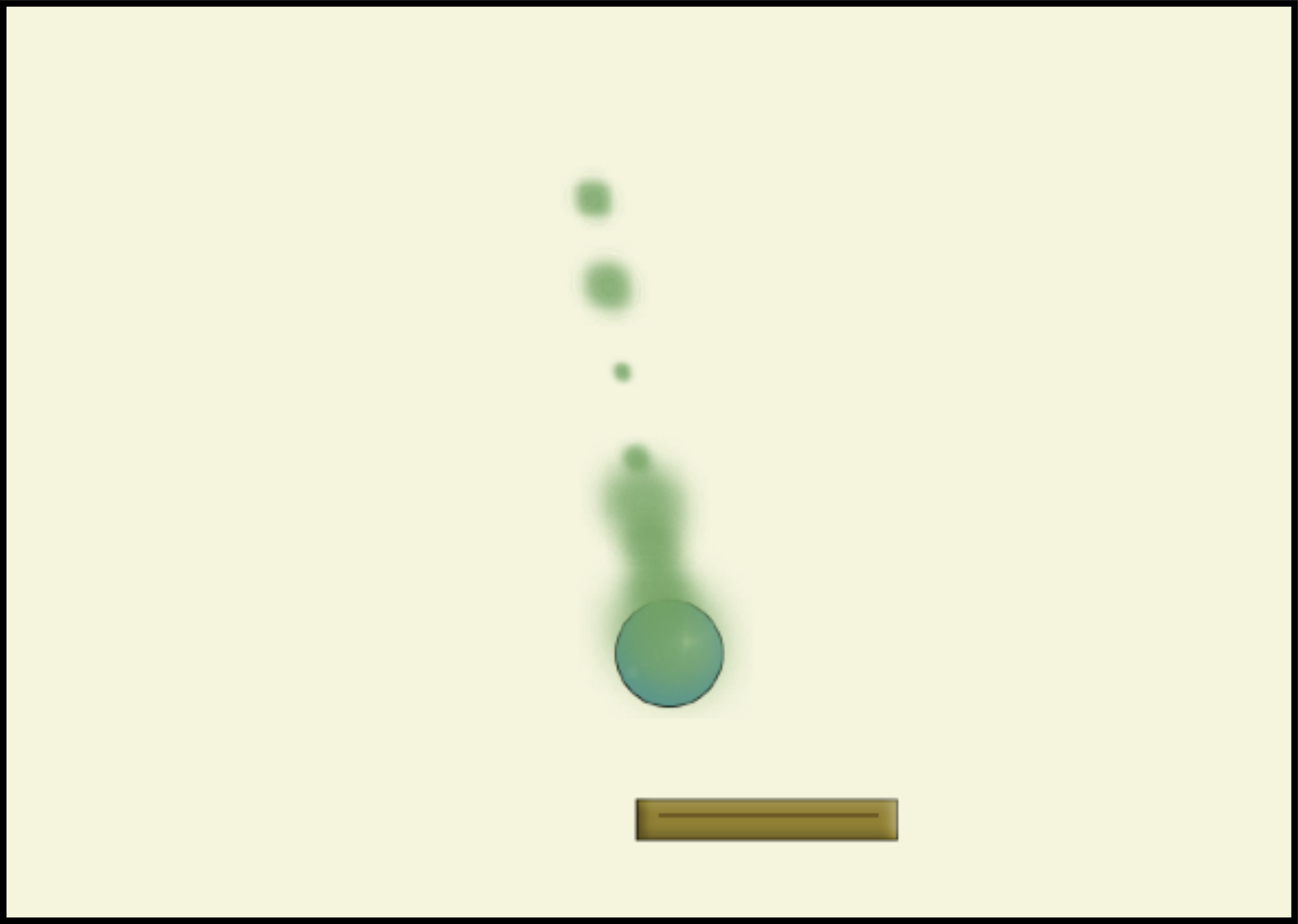 In some games, it is not only the functionality that matters, but also the visuals: What does it look like? How nice are the graphics?
In addition to just making and choosing nice graphics for your projects, you can also implement visual effects. This project shows an example: it is called smoke, and it demonstrates a smoke effect. We start with the breakout project we have seen earlier, but now we add an effect of green smoke to the ball. It makes no difference to the game play, but it looks nice.