Appendix C: Dealing with errors
Errors are an inherent part of programming. Everyone runs into errors in programming: from the most expert programmers, to the person writing their very first program. They are not a sign of deficiency; they are an expected part of the process. Indeed, programming can sometimes feel like the journey from one error message to the next!
Strype is specifically designed to eliminate some errors that you can get from Python, such as mismatched brackets, or incorrect indentation. Nevertheless, you will encounter errors in Strype. Each error arises from a unique situation so we cannot predict exactly how to fix each and every error. This appendix gives general strategies on how to deal with errors.
Errors can occur while you are editing, or they may occur when you run your program. If you are in the middle of editing you may want to ignore some errors until you believe you have finished. For example, if you create an if-frame and don’t fill in the condition, an error will be displayed telling you that the condition is empty. But that is expected, and you may want to ignore the error until you are ready to fill in the condition.
Errors that occur during editing will prevent you from running the program and you will need to fix them first. Other errors may only occur when that particular piece of code is executed — or the error might even only happen based on what happened earlier in that particular execution of the code.
C.1. What to do when you get an error
First: stay calm. Errors are one of the ways in which the programming system communicates back to you, to tell you it has encountered a problem. Your role is to take that error and work out how to resolve it.
The next thing to do, which may sound obvious, is to read the error message. This can be challenging. Error messages can be confusing, or full of jargon. Sometimes the error does not make sense, or will only make sense when you understand the problem. Some people new to programming get scared of trying to read the message at all, but make sure you do read it. It will be much harder to fix if you do not know what is wrong.
 The error message should pop-up in a bubble when it occurs. If you want to see it again later, you can move your mouse over the little exclamation mark (!) triangle on the right of the frame where the error occurred. Failing that, you can try running the program to try to make the error re-appear.
Check the code for spelling mistakes. It is easy to write "prnit" where you meant "print". This includes capitalisation. If you called your variable "myString" and then try to use it with "mystring", Python counts this as two different things, and you will get an error.
A further step which can help is to compare the code with an error to similar code without an error. For example, you might compare your code to code in this book (which should all be error free!), or to programs that you have previously written that worked. Pay close attention to punctuation like speech marks or brackets; often code errors arise from missing vital punctuation that is easy to overlook.
Finally, some errors, especially in larger programs, can actually be caused by mistakes earlier in the program. If the message does not make sense where it is displayed, look earlier in the program for possible related mistakes. Often the relation is the variables that are used on the line with the error.
C.2. Deciphering errors: example 1
Let us look at an example of deciphering an error. You might want to print the text Hello on the screen, so you write this:

At first glance, this looks reasonable. There are no spelling mistakes here. But if we click Run we get this error:
NameError: name 'Hello' is not defined
That is quite confusing. But let’s not just disregard it. Let us see what it is trying to tell us. It says the name Hello is not defined. But that is stupid: Hello is not meant to be a name. Maybe that gives you a hint, but maybe it is not enough. So let us compare to some similar, working code. Here is some code from earlier in the book:

Let us compare our code very carefully to that code. Do you see the difference?
It is the quote characters around the string. We are missing the quotes! And with that, the error message makes more sense: because we did not have the quotes, Python thought Hello is the name of a variable and did not find such a variable. We can add the quotes to fix the error:

If you have some text in Strype where you forgot the quotes, the easiest way to add them is to first select the text in question (either with the mouse, or shift and left/right keys) then type a quote character. This will surround the selected text in quotes.
C.3. Deciphering errors: example 2
Here is a different example in a short program, like the ones you will write early in the book. Imagine you wrote:
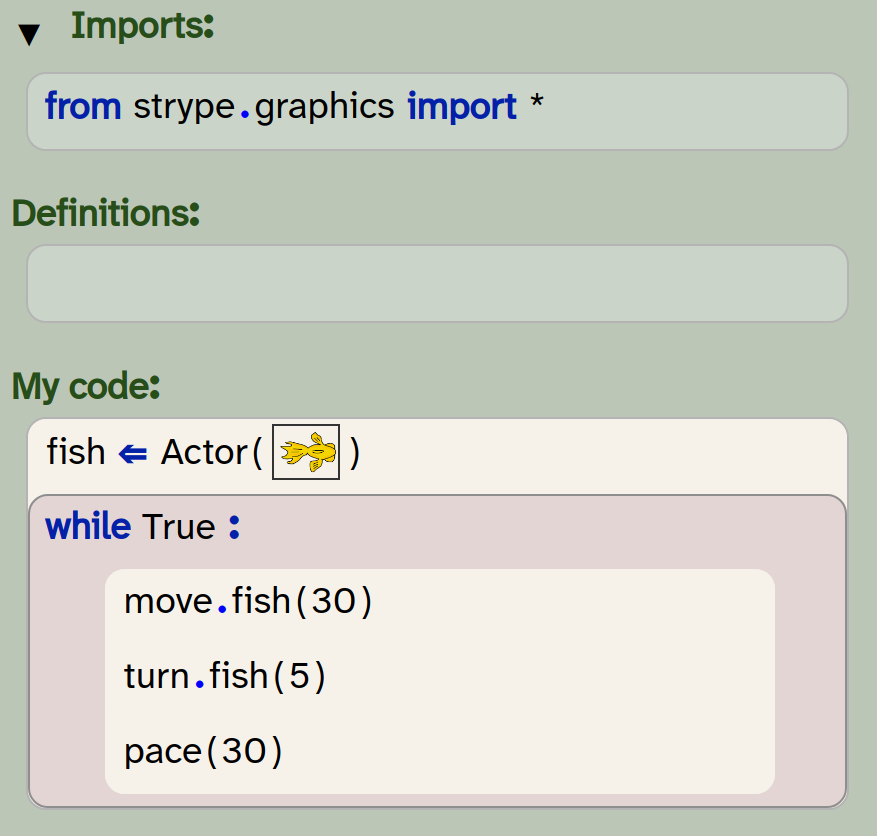
This looks fine, and valid sensible code. But when you run it you get an error:
NameError: name 'move' is not defined
So what has happened here? It says NameError so it’s something to do with a name. It says move is not defined. That’s not too bad in terms of jargon; it does not seem to know about move. But the import is present, you’ve created the fish, why is "move" not known?
A good strategy here is to compare carefully against code from the book. Here’s a piece of code we showed earlier in the book that you might have been copying:
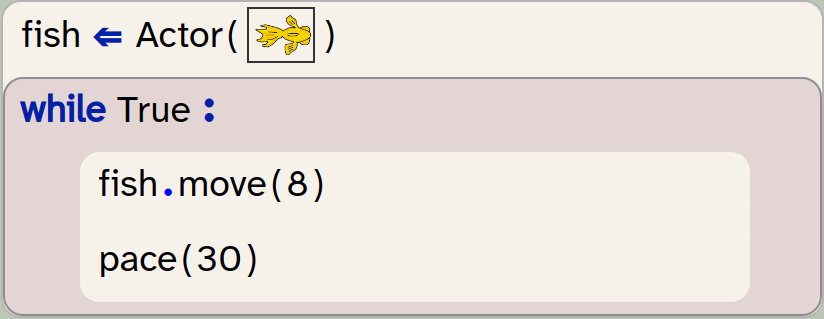
Perhaps at first glance that looks the same to you. But go through the code very carefully and be precise. You will find that the book says fish.move and your code says move.fish. This is the source of the error; the code is trying to call the fish method on a move object, and Strype is saying it doesn’t know what move is. So the fix is about the order of the words. These kind of precise details matter very much in programming, even if on first read it can seem plausible and seem identical to what you were copying.
C.4. Deciphering errors: example 3
Let us look at another example, in a slightly longer program, which produces a confusing error. This program is intended to make a fish character turn randomly:
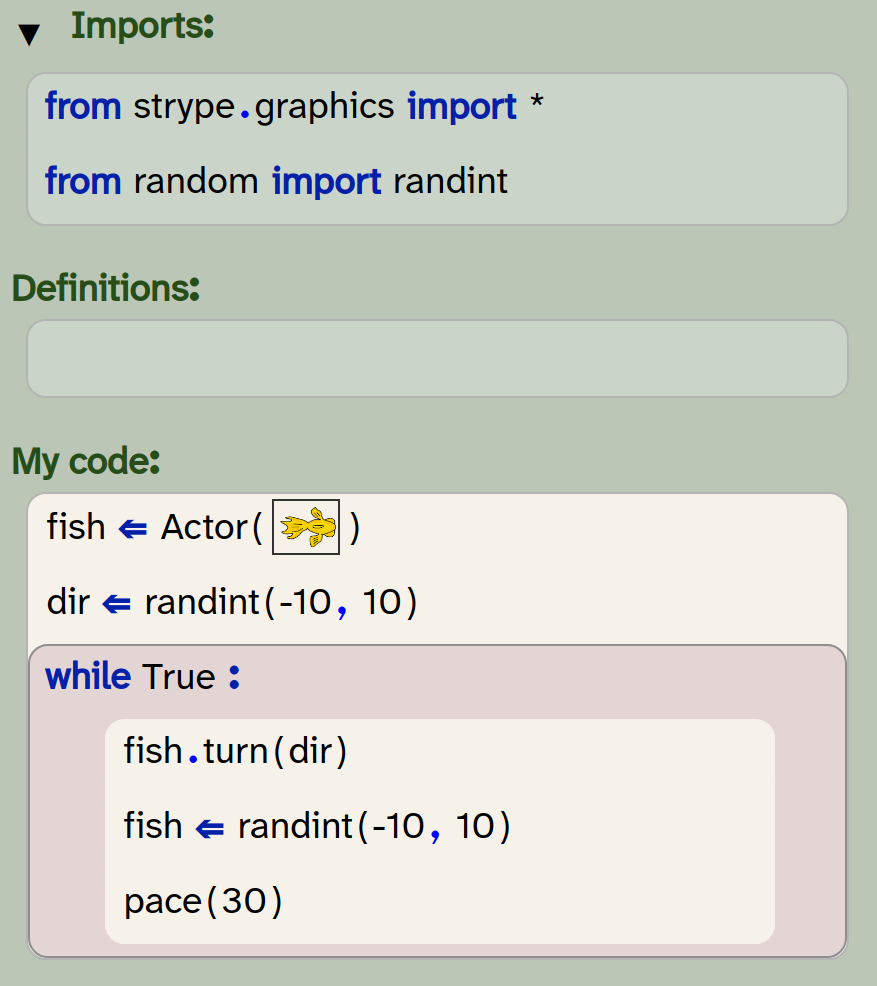
If you run this, you will get an error on the fish.turn(dir) line which says:
AttributeError: 'int' object has no attribute 'turn'
This is already a bit confusing in its wording as it is using different terminology to that which we have used here. It talks about attributes, which may not make sense. But it mentions having no attribute 'turn'. The line has the method turn so it somehow has not found that.
At this point it is not a bad idea to look up if turn was the correct name for the method (maybe it was rotate and you misremembered). But you will find in the code samples here and the documentation that turn is correct. So what does the other part of the message mean? It mentions 'int' object. Well, we know dir is an int, so int seems to make sense but what else could it be referring to on this line? The only other item is fish. Could it be a problem with fish?
Usually errors are caused by code that executed before, so we scan upwards in the code. The fish variable is clearly assigned an Actor, so that looks fine. But when dealing with loops, remember that code that executed before could be a later part of the loop that executed in the previous loop iteration. So we should also look below. You may notice fish is mentioned on the line below… where it is assigned a random number!
What has happened here is this: we accidentally assigned to fish when we meant to assign to dir. We got a quite confusing error because of the incorrect assignment on the line after the error. Programming often involves these intricate issues.
C.5. Welcome to the wonderful world of errors
When you program, you will encounter many more errors than these. We ourselves often encounter new errors we have not seen before, and we make use of similar techniques to find them. So remember:
-
Stay calm.
-
Read the error carefully for parts you do understand (and don’t worry if you do not understand it all).
-
Check the line with the error for obvious mistakes, especially spelling mistakes or punctuation problems.
-
Compare the code to other code which you know works; what are the differences and how might they explain the error?
-
Look at earlier code for possible causes, especially lines which involve the same variables as the line with the error.
-
Remember that earlier code can include things that happen in a function call, or in a loop where the current code resides.
-
You can also ask a friend, ask the teacher, or try searching the Internet for help.