Chapter 6. Collision detection
In the previous chapter, we have added the shrimp for us to eat. It is now time to investigate how we actually implement the eating. The idea is simple: we just want to remove the shrimp from the game when our fish moves over them.
To implement this, we need to learn about a concept in games: collision detection.
6.1. Detecting collisions: is_touching
Collision detection is the technical term for detecting when one actor (the fish) touches another actor (a shrimp).
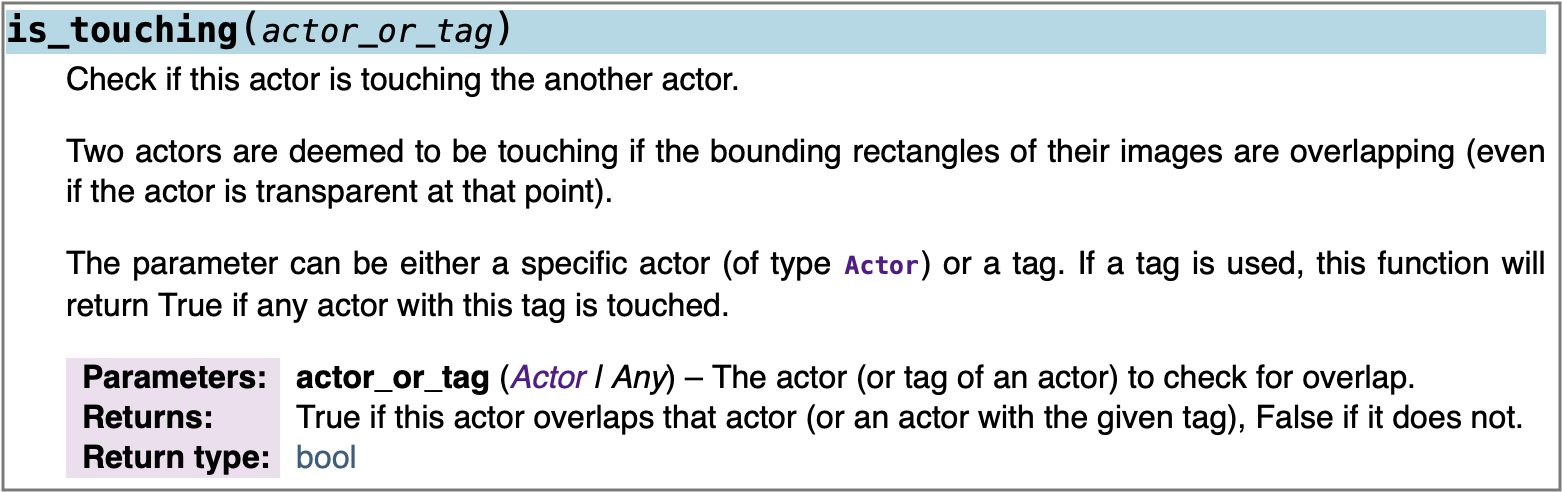
is_touching methodThe Strype graphics library provides a method to help with this: the is_touching() method from the Actor class. Figure 6.9 shows the documentation of this method (you can also find this in the library documentation in Strype).
We have previously discussed how to read the header of the method: We know to use the method name to invoke this method, and to provide a matching number of parameters. Let us first take a closer look at the parameter of this method.
We can see that we can provide either an actor (using a variable that holds an actor object) or a "tag" as a parameter. A tag is a label that we can provide for actors to identify them later. In our case, we wish to check for collision not just with a single actor, but with any of the shrimps. To achieve this, we will tag all shrimp objects as "shrimp" and then check for that tag.

6.2. Tagging actors
Figure 6.10 shows the header of the Actor constructor, and we can see there that it has an optional fourth parameter: the tag we have just mentioned.
We can use this to attach a tag to our shrimp objects to identify them later:

The tag could be of any type, but it is most common to use a simple string to mark a set of actors so that we can easily recognise them later. In the method call to check whether we are touching a shrimp actor, we can then write:

and this call will return true only if we are touching an actor that was tagged with the string "shrimp". This would ensure, for example, that we are not eating other fish, should we decide later to introduce other fish into our game, or the shark once we add that. Note also that this is a method – called on an object – not a stand-alone function, so we call it on the fish object. This makes sense, since it is the fish which wants to check whether it is touching another actor.
6.3. Return values
We should now also pay closer attention to the return value of the method. We already know that the documentation typically includes information about the general function of the method, and about its parameters. Here, we can see that the documentation also includes information telling us what the method returns to us.
 Functions and methods may return a value to the caller of the function. This is called the return value. Like all data in Python, the return value has a type. This is called the return type of the function.
We have already seen earlier that some methods and functions return a result to the caller of the function. It is time to see how we can find out about this from the documentation.
Figure 6.9 shows two bits of information about the return value, in its two last lines. It first tells us what it returns, and then it tells us the type of the return value. The first line tells us that the method will return the value True if this actor touches a specified other actor, and False if it does not. The type in this case is a data type we have not discussed before: bool.
The boolean type (in Python abbreviated to bool) is a type that can only hold two possible values: True or False.
In Chapter 3, we have already seen the types str, int and float. To this list, we should now add our boolean type:
| type name | full name | used for | examples |
|---|---|---|---|
bool |
boolean |
true/false values |
|
The bool type provides a type for data that can only hold two possible values: True or False. It is used, for example, as the expected type for the condition in an if-statement.
When a method returns a value, we typically do something with that value. One option is to store it in a variable:

For method calls returning boolean values, we have already seen before that we can also use them directly in if-statements. Figure 6.11 illustrates this: The condition in an if-statement needs an expression that returns a boolean value (true or false), and our method call returns just such a value.
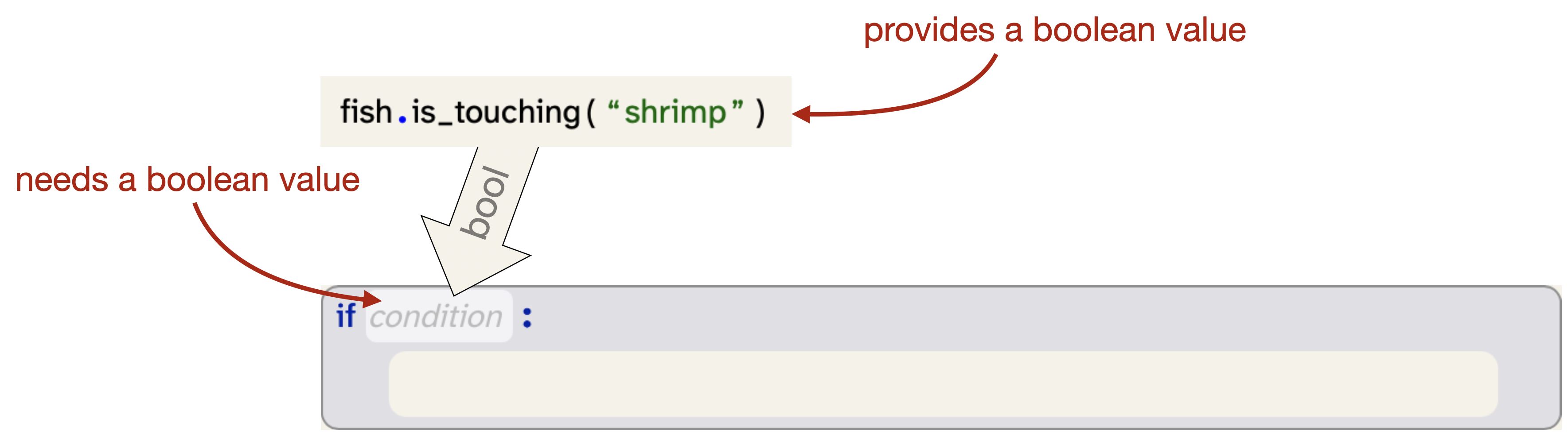
If you have done the exercises in Chapter 4, you have, in fact, made use of this before when you worked with the Fat Cat project. There, too, we used return values from method calls as conditions in our if-statements.
Exercise 6.1 Look through the documentation for the Actor class. What other methods can you find that return boolean values?
Exercise 6.2 What methods can you find in the Actor class that return int values?
Exercise 6.3 In your program, add the "shrimp" tag to your shrimp actors. You do this by adding an additional parameter to the creation of the shrimp, as shown above.
Exercise 6.4 Add an if-statement to your program to check whether the fish is touching a shrimp, as discussed. In the body of this if-statement, call the method fish.remove_touching("shrimp") to remove the shrimp if we have run into it. Where should this if-statement go?
Exercise 6.5 Test your program. The fish should now remove the shrimp when it swims over it. If this is not happening in your program, go back and check your code. Have you added the right tag to the shrimp? Have you used the same tag in your is_touching check?
Exercise 6.6 In the exercise above, we have used the remove_touching() method. What does this method do? What does it do when the actor is not currently touching another actor? What does it do when it is touching two other actors at the same time?
Exercise 6.7 If the fish touches two shrimp at exactly the same time, will they both be eaten? Explain your answer.
6.4. Bounding boxes
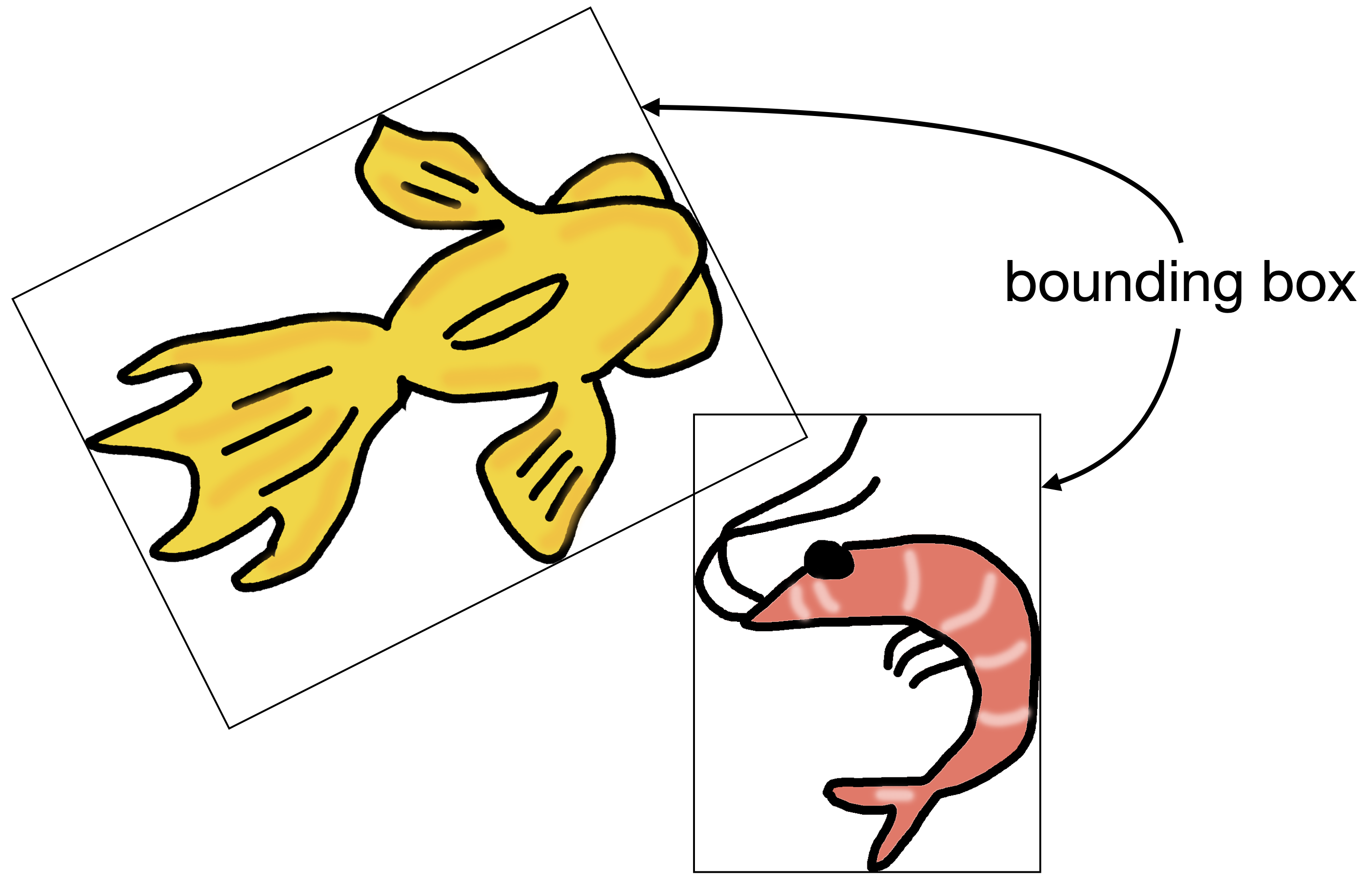
If you have watched closely when playing with your project, you may have noticed that often the shrimp disappear just before the fish seems to touch them. This has to do with how graphics are managed in many computer graphics systems (including Strype).
In Strype, even though images appear to have free form, all graphics drawn to the screen are, in fact, rectangular. Figure 6.12 illustrates this: it shows the bounding box of each image. The bounding box is the actual boundary of the graphic being painted. The image appears to be of arbitrary shape by using transparent pixels: the parts of the image where we do not want to show anything are transparent, making them essentially invisible. For the computer, they are, however, still part of the image, even though we cannot see them.
For the purposes of collision detection, two actors are "touching" when their images overlap. Since the invisible pixels are part of the image, this means that they are effectively touching when their bounding boxes overlap. The effect is that they are often technically "touching" even though the visible images do not touch each other.
 When you make your own images for use with actors, make sure to crop any unnecessary transparent area around the visible part of the image. If an image has transparent padding, it increases the size of the (invisible) bounding box and makes collision detection less precise.
6.5. Adding a predator
Now, let us make the game more interesting by adding a predator that hunts the fish: a shark. An image for this is in the Chapter 6 section of the book projects, but as always, you are free to use your own actor type and image for this. For example, if your player actor is a spaceship, then the "predator" might be an asteroid which you have to avoid hitting.
The beginning of this is easy: at the beginning of the game, where we create the fish and shrimp, we now add a line to create a shark:

Next, we add code into our main loop (after all the code dealing with our fish) to make the shark move:

It might be a good idea to make the shark move a bit faster than the fish to increase the challenge.
Exercise 6.8 Make the additions shown here to your own program: Add the shark and make it move.
Of course, at the moment the shark moves only in a straight line, and it gets stuck at the right edge of the screen. To fix this, we want to make the shark turn when it reaches the edge of the screen. The Actor class has a method to check for this: the is_at_edge() method returns True if the actor is at the edge of the world.
Exercise 6.9 Look up the is_at_edge() method in the documentation. What is its return type? What does it mean, precisely, to be "at the edge" of the world?
Exercise 6.10 In your program, after the method call that makes the shark move, add an if-statement. Use the shark.is_at_edge() method for the condition of the if-statement, and make the shark turn 15 degrees if it is at the edge.
Exercise 6.11 Is 15 degrees enough to turn away from the edge? Will the shark manage to turn enough to continue? Why not turn 180 degrees? Experiment with different degree values for the turn and see what the effect looks like. Explain what you see.
Next, we should make the shark eat the fish when they meet. So let us add some collision detection checking whether the shark touches the fish. This is now not too difficult, because it closely mirrors the code for the fish eating the shrimp:
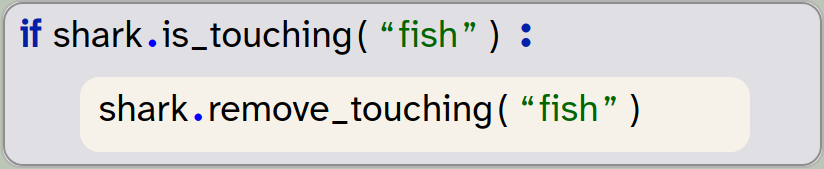
We need to remember, of course, to tag the fish with the "fish" tag when we create it, so that it will be identified.
Exercise 6.12 Add code to your main loop to make the shark eat the fish. Test your program to make sure this works.
We now have the beginnings of a simple game: We have a keyboard-controlled character that has a task and has to avoid being caught. (This version of the program is in the book projects as yellow-fish-v5.)
If you have programmed along with your own images and characters, your story might, of course, be different: you might have a game where you control a spaceship that picks up astronauts, or you might be controlling a white blood cell that removes bacteria and tries to avoid a virus. You can see that very similar game playing code can be used to present different stories.
There are many ways in which we can now improve this game and make it more interesting, and we will suggest some shortly.
6.6. Summary
In this chapter, we have made good progress in developing our yellow fish game. In fact, we are getting close to having a playable game now.
We have investigated collision detection of actors, using the is_touching() method. This has allowed us to implement eating the shrimp, and the possibility of being eaten by the shark.
In the process of this, we have encountered return values and the bool type, and we have seen some more examples of using methods that return a boolean as a condition in an if-statement.

-
Functions and methods may return a value to the caller of the function. This is called the return value. Like all data in Python, the return value has a type. This is called the return type of the function.
-
The bool type provides a type for data that can only hold two possible values: True or False. It is used, for example, as the expected type for the condition in an if-statement.
Breakout
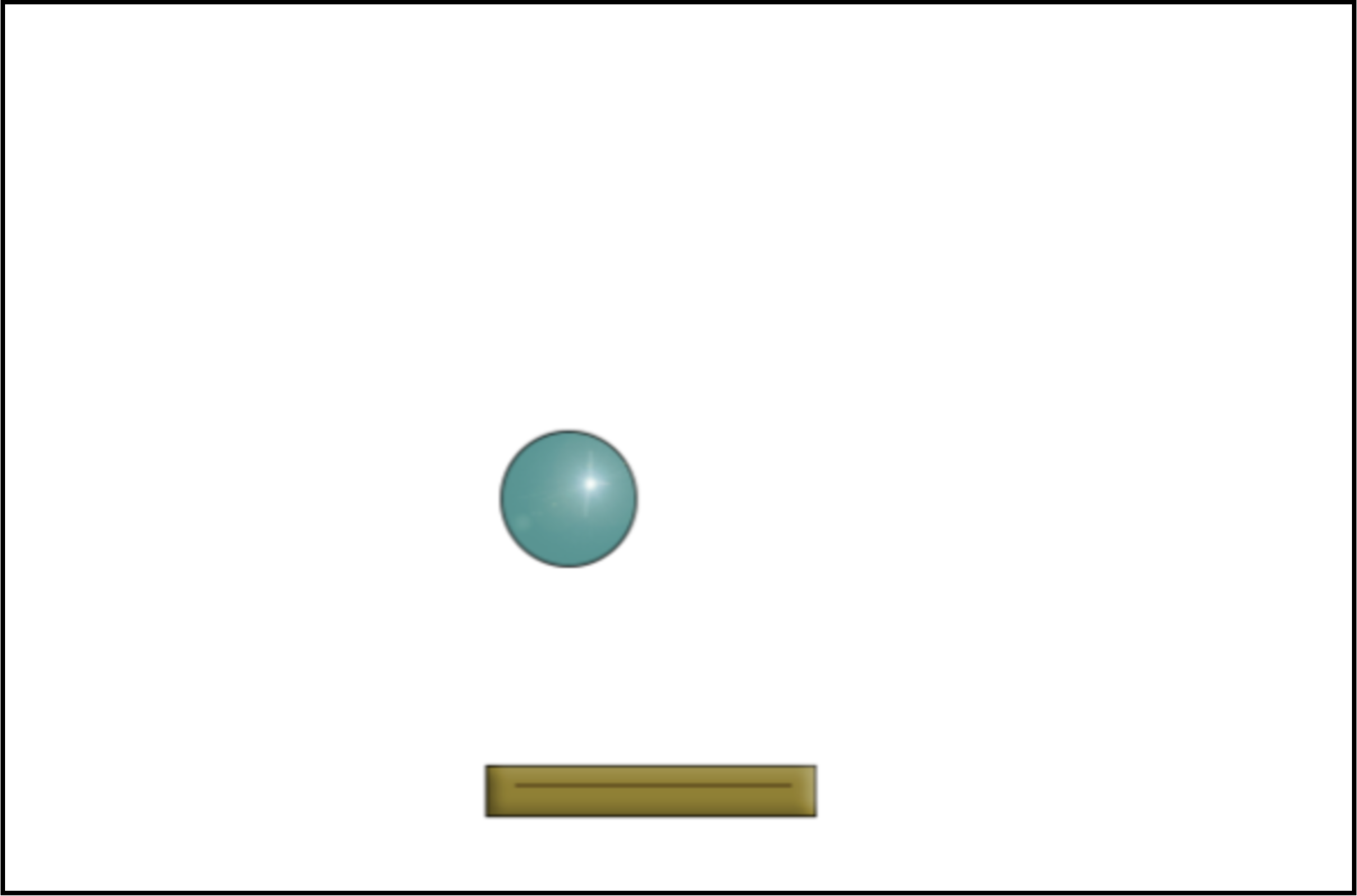 Breakout is another classic arcade game. (Again, search online for "breakout game" if you are not familiar with it.)
In this version, only the paddle and the ball have been implemented so far. To complete the game, you would have to add the rows of bricks at the top and implement the game logic. Of course, many visual and audio effects can be added.