Chapter 7. Writing good code
The obvious next step now is to forge ahead and make our game more interesting. You can probably think of all sorts of things that you could now add to make your game more exciting. Every new idea results in new code, and our program will get longer and longer. That is normal. But we will slowly get into a problem: long programs are hard to read and difficult to understand.
Therefore, before we make further additions, we will discuss how we can manage this. By using a few techniques to maintain good code structure, we can avoid this problem, and ultimately achieve much more with our game.
So let us take a step back and reflect on our code first, and then go on to add more functionality in the next chapter.
7.1. Analysing program structure
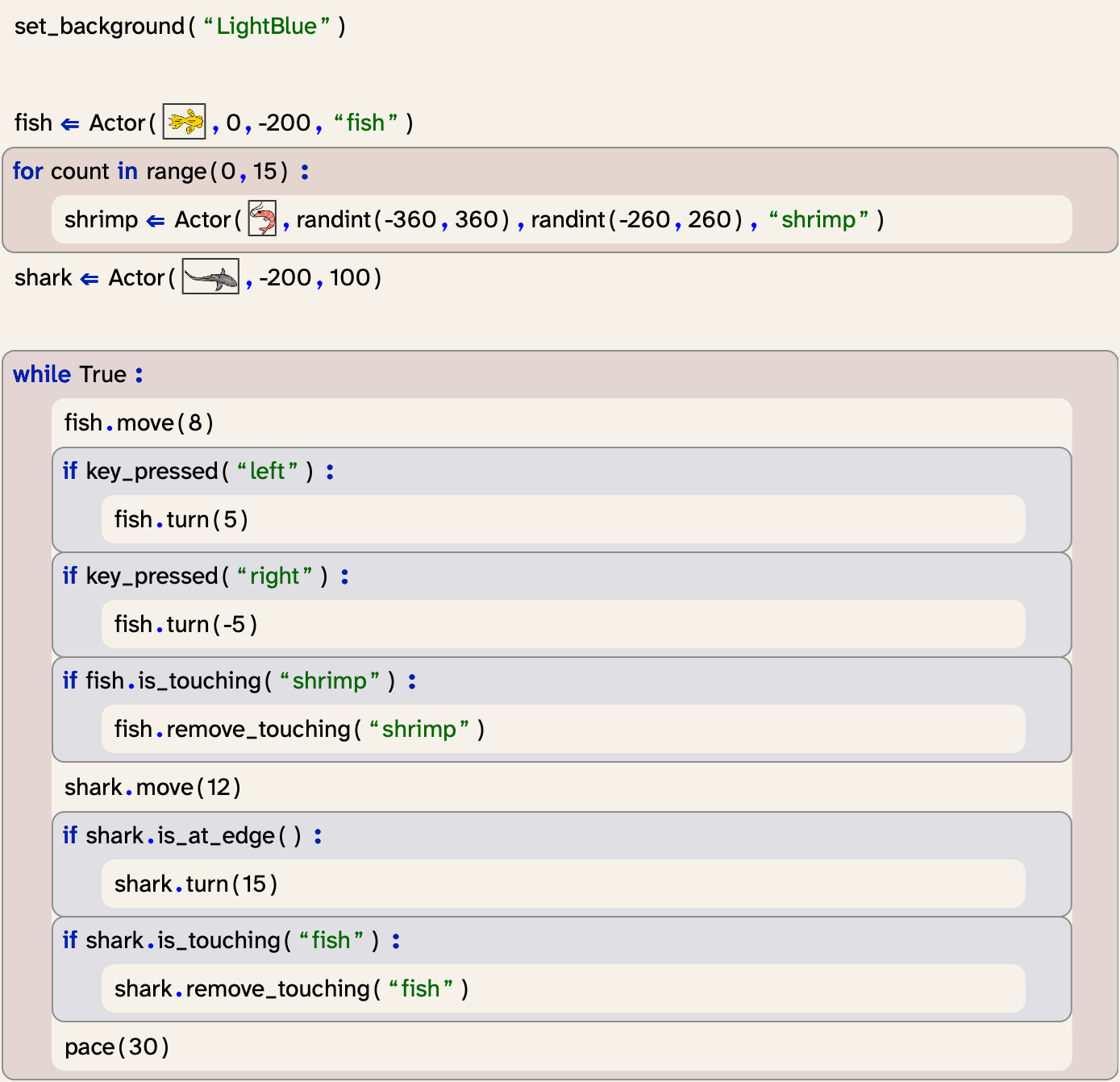
So far, our code is not too bad. Our program still spans only about a page (Figure 7.13), and with some effort and practice we can manage to read and understand it. Over time, however, this will get worse. Our program is still very simple, but as we add more improvements, its size will quickly grow. We will soon deal with programs that are not one page long, but dozens of pages. In professional systems, programs often span thousands or millions of lines of code.
To be able to manage longer programs, we need a way to structure our program text better. And while our program is still fairly short, it is never too early to start with this. Developing a good program structure is a habit we should get into from the start, because later on it will be essential. When we deal with larger projects later on, we would not be able to work with them without this practice.
So what does this mean exactly?
Currently, the program text does not really reflect the logical structure of the program very well. We have written the program as a single sequence of statements in the "My code" section of the editor. If another programmer now came to read our program for the first time, they would have few clues about which part of the code does what, and they will have to read the program line-by-line to find out. As our programs get longer, this will become more and more challenging.
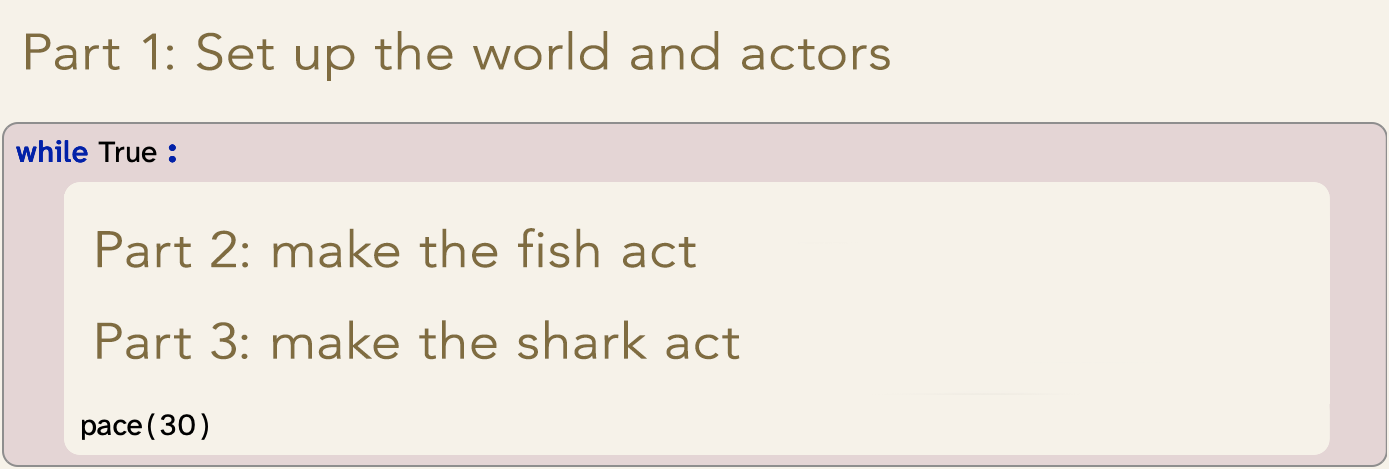
If we analyse our program carefully, we can see that it consists of three distinct logical parts (Figure 7.14):
-
First, we set up the world (set the background and create the actors)
-
Then (in the loop), we make the fish act (move, turn and eat)
-
And finally, we make the shark act (move, turn and eat)
We can improve our program by reflecting this logical structure in our program structure. To use this, we use functions.
7.2. Defining our own functions
We have encountered functions before in the context of using ready-made functionality: We have, for example, called the set_background function to set the world background colour, or the randint function to obtain a random number. In both of these cases, the functions came from a library.
In the fireworks project in Chapter 3, we have also seen that functions can be defined in our own project. We called, for example, the place_rocket and ignite functions to invoke functionality defined in the "Definitions" section of our program.
We can now create our own functions and move some of our code into them. This way, we can put all code that serves one single logical purpose into one place and give it a logical name. We start with this by making a function for the fish actions.
Exercise 7.1 Move the frame cursor into the "Definitions" section in your program and enter a frame for a function definition. Since the function we are about to create will be responsible for moving the fish, you can call it "move_fish". It does not need any parameters.
Exercise 7.2 Move all the code that is responsible for the fish actions from the main loop into the move_fish() function. This includes the code to make the fish turn and eat shrimp. (Tip: Use Shift-Arrow down to select multiple frames, then use Cut (Ctrl-x) and Paste (Ctrl-v) to move them.)
Exercise 7.3 In the place where the fish code had been (in the main loop), insert a call to the move_fish() function.
Exercise 7.4 Do the same for the shark: Create a move_shark function, and move all the shark code into it, and call the function from the main loop. Test your program: If all went well, it should work just as it did before.
Exercise 7.5 Create another function called "setup". Move all the code that sets up the world into this function. Then move the two frames that create the fish and the shark to the beginning of the "Definitions" section, before (outside) the first function. Again, test your program.
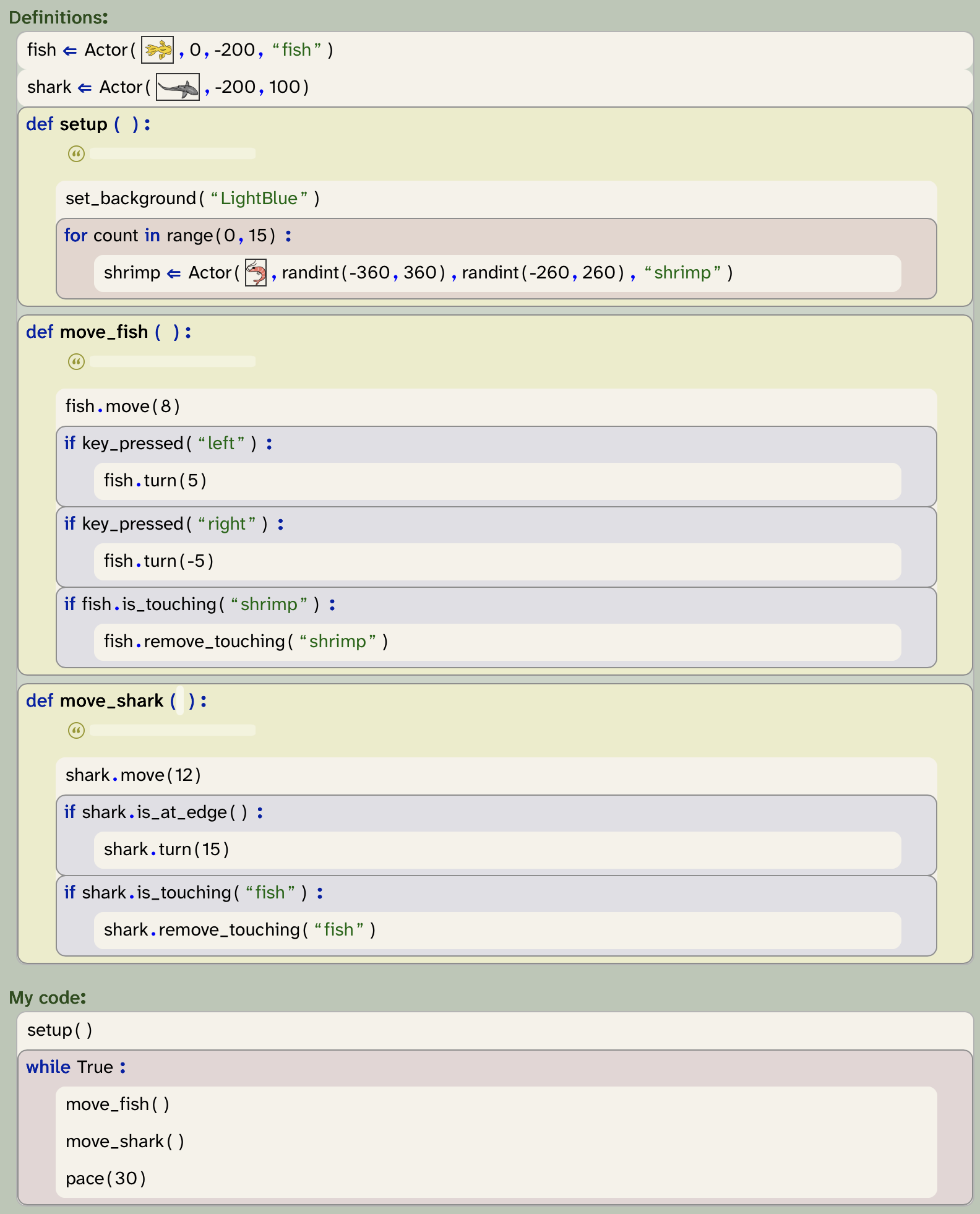
Figure 7.15 shows what our program now looks like. When the execution reaches the setup() function call, it jumps up to the setup function, executes its body, and then returns to the function call and continues execution there. The same happens for the move_fish() and move_shark() calls.
One further change that we made here is that we have moved the creation of the fish and shark variables out of the function, and added them straight to the definitions section. (The definitions section can contain definitions of variables and functions, but no other code.)
The reason for this is that variables defined inside a function are, by default, only usable within that same function. We need, however, to use the fish and shark variables in the other functions as well, so they need to be defined outside the function to be visible to all functions. We will discuss this aspect of variables in more detail later.
 Sequences of code can be moved into functions, and the functions can be called at the place where we would like to execute that code. This makes our program more modular, and easier to read and maintain.
The new program does exactly the same thing it did before the reorganisation, but it has a nicer structure. So what exactly are the advantages of this new version?
7.3. Readability and naming
The more we work with programs, the more we will need to read programs. Sometimes beginning programmers think programming is all about writing code. That is certainly important, but it is by far not everything: reading code will be just as important – if not more important – as writing code.
As your programs become more interesting and larger, you will take more and more time to work on them. You will work with code that you have written months earlier, and you have to read it again to remind yourself what it does.
If you continue programming, you will start working with other programmers. You will need to read code that others have written, and you will need to write code for others to read. When you progress even further, you may contribute to an open source project, or you may find some publicly available code on the internet that you’d like to use and extend. In each case, your work will start by reading large amounts of code that others have written before you can add your own.
In each of these cases, it is important that the code you are working with is readable. Being readable means that it is written in a way that helps a human reader to make sense of it and understand it. Not all code is easily readable, and there are big differences in how different programmers write code. Writing your code with readability in mind is one of the most important principles if you care about your program.
Readability is one of the most important aspects of a program. Programs can be written in many different ways, and this can affect greatly how easy or hard they are to understand. Always strive to make your programs as easy to read and understand as possible.
The most basic thing you can do to aid readability is to choose good names for your variables. From the beginning, we have named our variables so that they describe what they are used for. We used, for example "fish" for the variable holding the fish, and "shark" for the variable holding the shark.
This seems obvious in retrospect, but it is by no means automatic. We could have named our variables "a", "b" and "c" instead of "fish", "shrimp" and "shark", and the program would have worked just the same. In fact, we have seen many programs where programmers did just this: they used one-letter variable names, just to save a bit of typing, and the program is full of variables called things such as "n", "p1", or "c".
A programmer can get away with using lazy names for variables as long as the program is really small, and no other programmer needs to read it. But as soon as we want to work with others, or work with our own program for a longer time, we should take variable naming seriously. If you name your variables in a way that they describe well what is stored in them, the whole program will be much easier to read and understand. You should get into the habit of always thinking carefully about naming your variables.
So what has this discussion to do with our use of functions?
The answer is that using functions gives us a chance to attach a name to a section of code to describe what it does. For example, we have taken all the lines of code that have to do with moving the fish, and put them into a function called "move_fish". The name of the function describes to the reader what happens in this function, and at the place in the code where it is actually needed, it now says "move_fish()" instead of listing a long sequence of statements. This is of great help to a reader of this program, as it gives them a very useful hint what the program does here, without cluttering the main loop.
The ability to attach a meaningful name to the block of code – in the form of a function name – is the first advantage of our restructure.
Take the naming of your variables and functions seriously. Always try to use a descriptive name that gives a good hint what the variable is used for, or what the function does.
Exercise 7.6 Look back through your program. Make a list of all names that you have used in the program. Think about each of them: are they well-chosen? Do they describe their purpose well?
 A note about names: In Python, you are often expected to name things. For example, you can make up your own names for variables or for functions. Python has some rules about what these names must look like:
-
You can use letters, digits and the underscore ( _ ) for names, but no other special characters.
-
You cannot use spaces in a name.
-
The first character cannot be a digit. (It has to be a letter or an underscore.)
-
Names in Python are case-sensitive. This means that the names "number" and "Number" are different names.
The technical term for these names is "identifier". You may come across this term occasionally: When the system asks you for an "identifier", it is asking for a name in this format.
Exercise 7.7 Which of the following names are valid Python identifiers, and which are not? Why?
sum
sum01
1sum
sum_
sum 01
sum%1
_
33
__33__
sum+
 Good programming practice: Choose names carefully
Pay close attention to the names you give to variables and functions. Choose names that describe as well as you can what a variable is used for, or what a function does.
7.4. Abstraction
The second advantage of using functions in our program is abstraction. Abstraction is the technique of solving a sub-problem first, and then being able to ignore the details of the problem once it has been solved.
For example, if we now read our main loop, we can see that in each loop iteration it moves the fish, moves the shark, and maintains the pace of the loop. This is really easy to understand, and as long as we are happy with the behaviour of the fish movement, and we trust that it works as intended, we do not need to worry about the details of how it works any longer.
We have essentially treated the programming of the fish behaviour as a distinct sub-problem, which we solved by writing a function. When we need to invoke the fish behaviour, we can now call it just using its name, without needing to worry about the details of how it works. We treat "fish_movement" as if it were a single task, and we free our minds to concentrate on other things. We "abstract from" the details of the task, and treat it as a single, easy thing.
As our programs become longer and the tasks we wish to implement more complex, this becomes really important. Soon we will write programs solving problems that are too big to hold all details in our head at the same time. We will solve those problems by dividing them into sub-problems, which are smaller and can be solved more easily. These sub-problems are often solved in functions. And once we have written enough functions solving enough sub-problems, the solving of the overall problem becomes easy and straight forward.
Abstraction is thus a technique that wraps a potentially complex task into one unit and gives it a name. It hides the complexity, and makes it easy for us to use it without needing to think about the complicated details.
Even more importantly: it allows us to share the work between different people. For example, one programmer, somewhere, once implemented the randint function from the random library, or the is_touching method from the graphics library. But since we are using abstraction, we do not need to understand or worry about how these functions work internally. We just use them as a single instruction that does what we need. We aim to achieve the same with our own functions.
To use a function without the need to study its body, we just need to understand how to call it and what it does. The one additional thing that is needed is a good function comment that gives a reader enough information to understand what a function does without the need to read the body. So far, we have neglected the comment in our own functions. It is time to fix this.
Exercise 7.8 For each of the functions defined in your program, write a function comment. This is done in the area under the function header, marked with a small double-quote symbol. In the comment, describe what the function does.
The idea of abstraction is supported in Strype using the folding functionality of the function definition frame. Once the implementation of a function is finished, you can fold in the implementation to simplify the view of your program. Since you only need to know the header to call the function, this will be all you need to see for much of the time. Only when you later want to modify the function do you need to fold it out again.
Good programming practice: Always comment carefully
You should always add a comment to every function you create. The comment should state what the function does, what parameters it expects, and what it returns. Another programmer should be able to call your function without having to look at the implementation; the comment should tell them all they need to know.
Within the code, use comments to add information when a segment of code is not obvious.
7.5. Reuse
Yet another advantage of using functions for part of our code is reuse: Once we have created a function for a subtask, we can call this function multiple times in our program, without the need to write out the whole code again. We will see more examples of this in later projects.
7.6. Refactoring
The technical term for what we have done when we move part of our code into functions is refactoring. Refactoring is an activity of improving the structure of our code without adding any new functionality. Typically, after a step of refactoring, the program behaves in exactly the same way as before, but the internal structure is better. The structure matters, because it typically makes it easier to understand, extend or modify the program.
Refactoring is the restructuring of a program to improve the internal quality of the code. Refactoring maintains the functionality of the program: it will do exactly the same after the refactoring as it did before. The improved structure makes it easier to do further work with the program.
The program as it looks after the improvements described here is available in the book projects as yellow-fish-v6.
Good programming practice: Use small functions
You should always strive to break up your code into separate functions. Your "My code" section should never hold a long sequence of code. If it does, it is time to move some code into separate functions.
If functions get long, break them up as well. Each function should always be responsible for only one well-defined logical task. If it does more than that, create a new function.
7.7. Summary
In this chapter, we have not added new functionality. Instead, we have worked on improving the structure of our code. This is necessary, because adding more functionality would very quickly become very difficult otherwise.
We have discussed modularisation, which is the structuring of your program into distinct logical units. We have seen that we can define our own functions, and how functions are used to create those units. Each function is given a name, and we have discussed the important aspect of how you should name functions and variables.

-
Sequences of code can be moved into functions, and the functions can be called at the place where we would like to execute that code. This makes our program more modular, and easier to read and maintain.
-
Readability is one of the most important aspects of a program. Programs can be written in many different ways, and this can affect greatly how easy or hard they are to understand. Always strive to make your programs as easy to read and understand as possible.
-
Take the naming of your variables and functions seriously. Always try to use a descriptive name that gives a good hint what the variable is used for, or what the function does.
-
Refactoring is the restructuring of a program to improve the internal quality of the code. Refactoring maintains the functionality of the program: it will do exactly the same after the refactoring as it did before. The improved structure makes it easier to do further work with the program.

Platformer
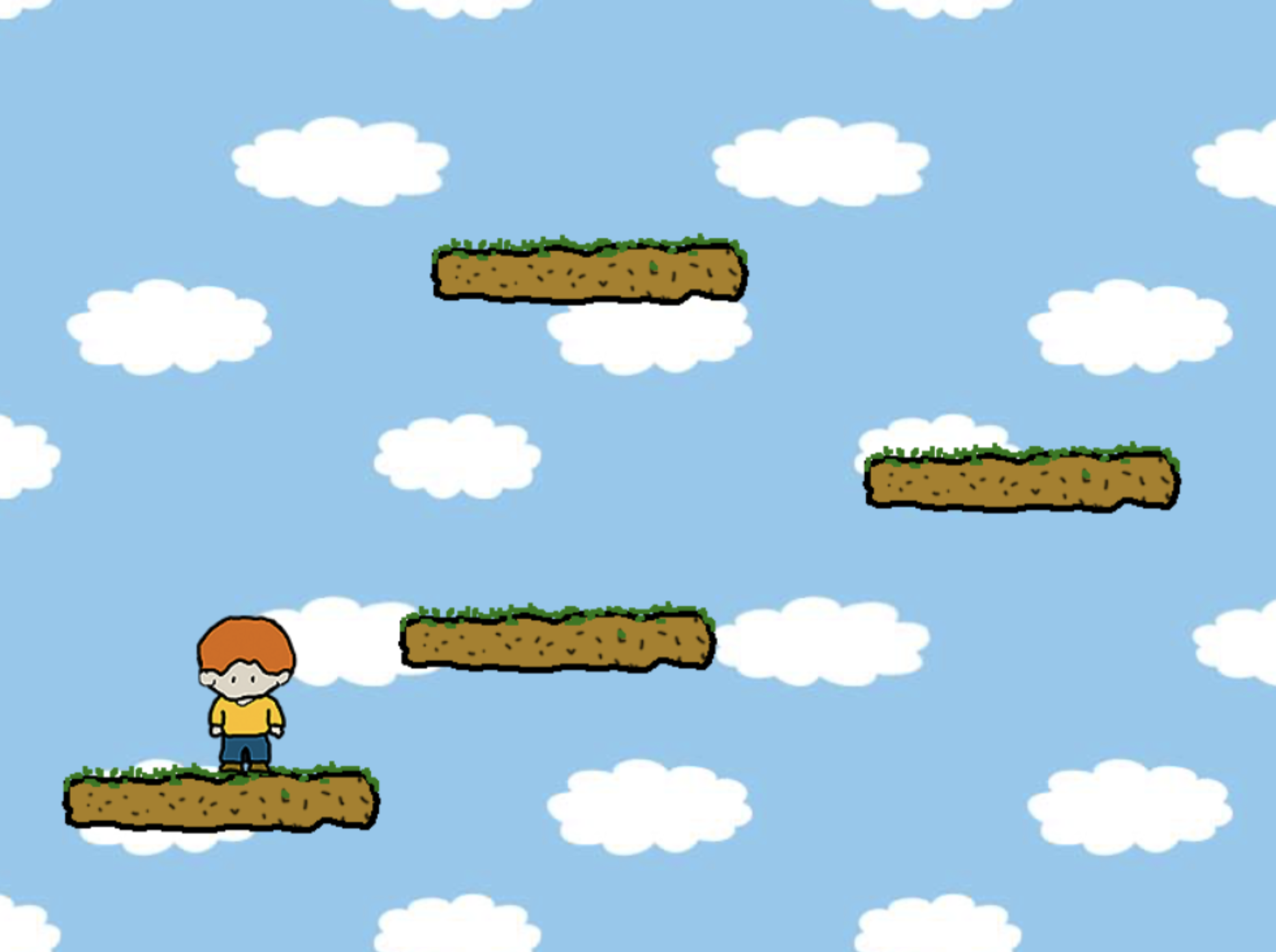 This project implements the beginnings of a classic platform jumper game. So far, nothing very interesting happens in the game, but it shows how you can implement the jumping from platform to platform (platform-v1).
There is also a second version of the same project (platform-v2), in which the game character is animated to show a walking effect.
Extending the game to make it interesting and playable will let you practice many of the concepts you have learned so far.